

How to Run an Action Once After Processing Multiple Records in Flows
When you need to process multiple records one at a time, but run a final action only after all of them are done, you'll need to combine two tools: the Iterator and the Aggregator. This guide shows you exactly how to set this up.
Before You Start
This guide assumes you have:
- A Knack app with at least two related tables
- A Flow already triggered (by creating or updating a record)
- A search step that returns multiple records
- Actions you want to repeat for each record, and a final action that should run only once
For this example, we'll use a simple scenario: When a user record is updated, find all their connected events, create a registration for each event, and then log that the registrations were completed—just once.
How This Works
The Iterator repeats actions for each record in a list. If your search finds 10 records, any action inside the Iterator runs 10 times.
The Aggregator collects the results from those repeated actions and combines them into one list. Once all records have been processed, the Flow continues to the next step—just once.
Here's the pattern:
- Search finds 2 records
- Iterator processes each record one at a time
- Actions inside the Iterator run once per record
- Aggregator waits for all iterations to complete
- Final action runs once
Think of it this way: The Iterator says "do this for each item." The Aggregator says "once you're done with all items, continue to the next step once."
Step-by-Step Setup
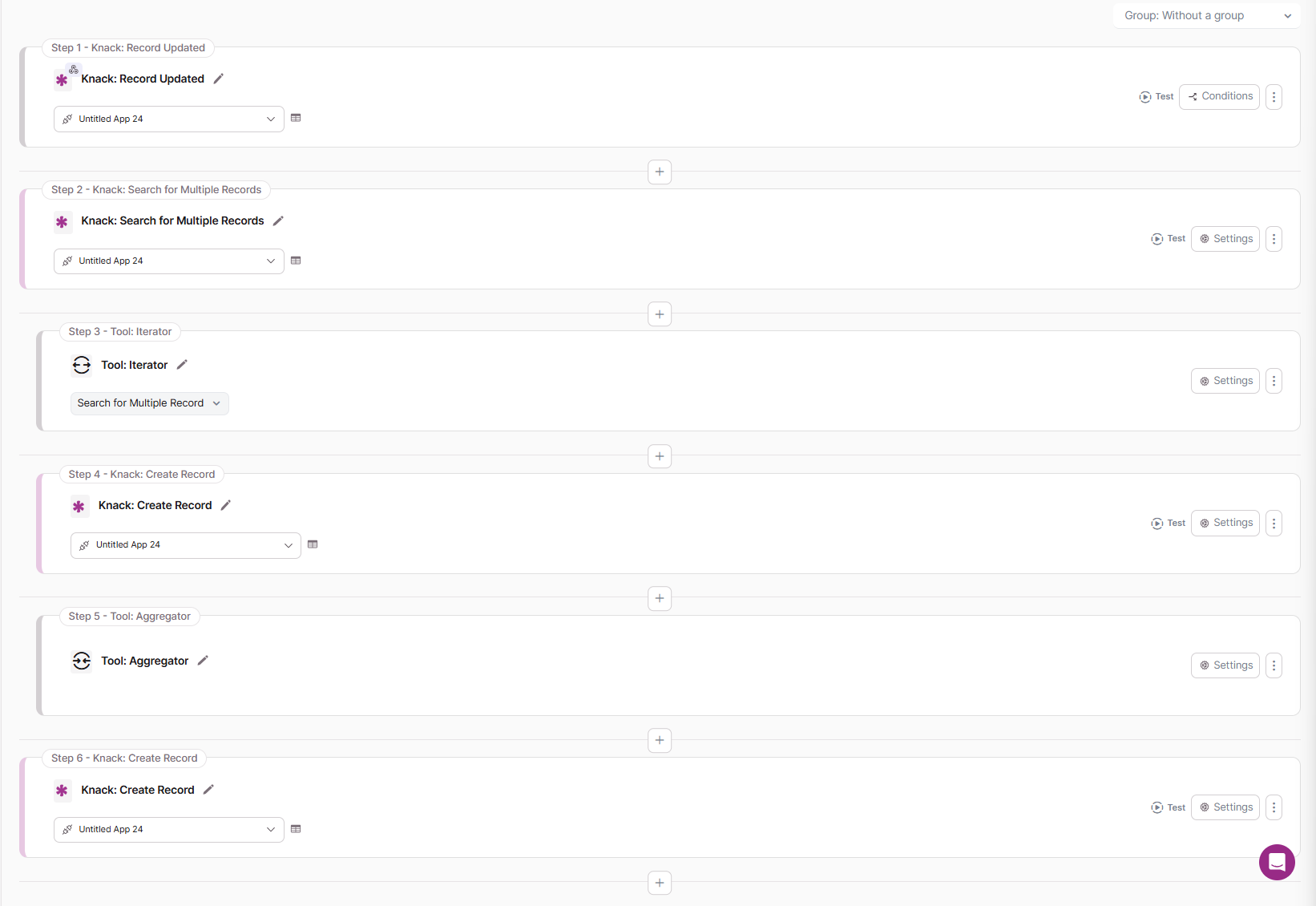
Step 1: Configure the Record Updated Trigger
In this example, we're using a Record Updated trigger on the Name table.
When a user like "Sarah" updates their record, the Flow starts.

Step 2: Search for Multiple Event Records
Add a Search for Multiple Records step to find all related records.
In our example, we search the Events table for records.
This search returns two Event records: "Annual Conference" and "Networking Mixer."

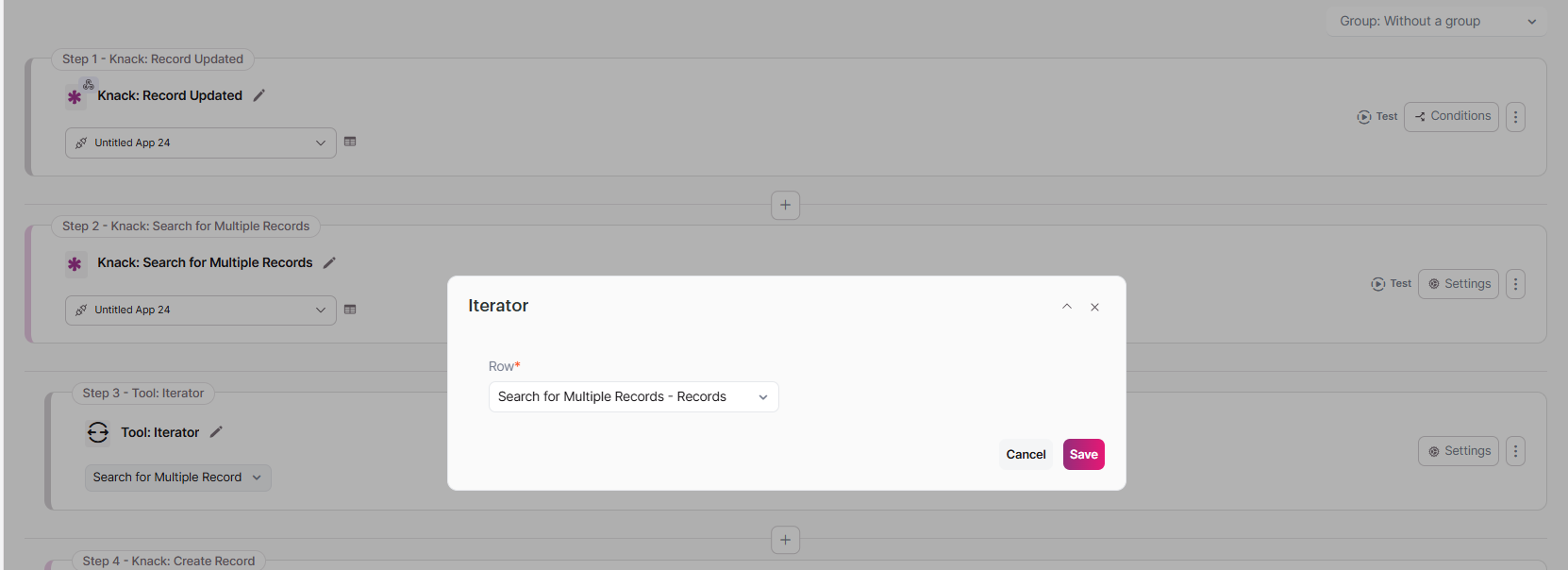
Step 3: Add the Iterator
Add the Iterator tool after your search step.
The Iterator will take the two Event records and process them one at a time. Any action you place inside the Iterator will run once for each Event.
Step 4: Add the Create Registration Action
Inside the Iterator, add a Create Record action pointed at the Registration table.
This will create one Registration record for each Event found by the search.
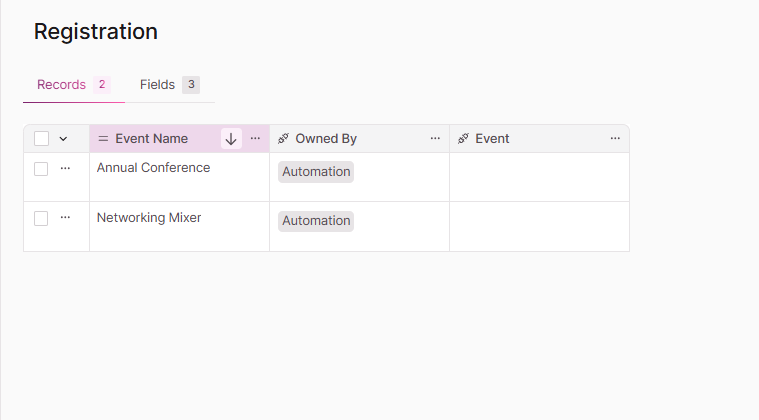
Since the search found 2 Events, this step will run twice:
- Once to create a Registration for "Annual Conference"
- Once to create a Registration for "Networking Mixer"
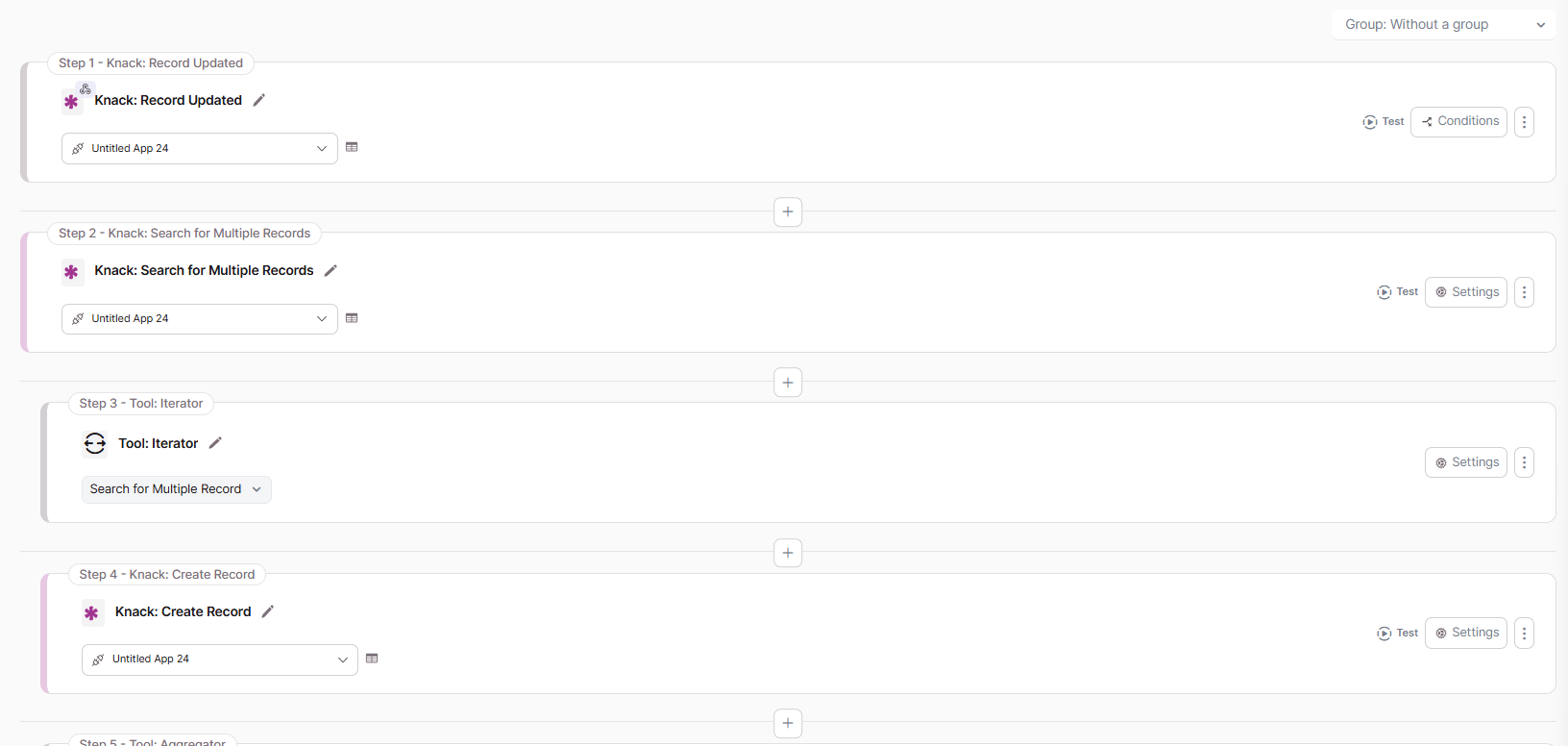
Step 5: Add the Aggregator Tool
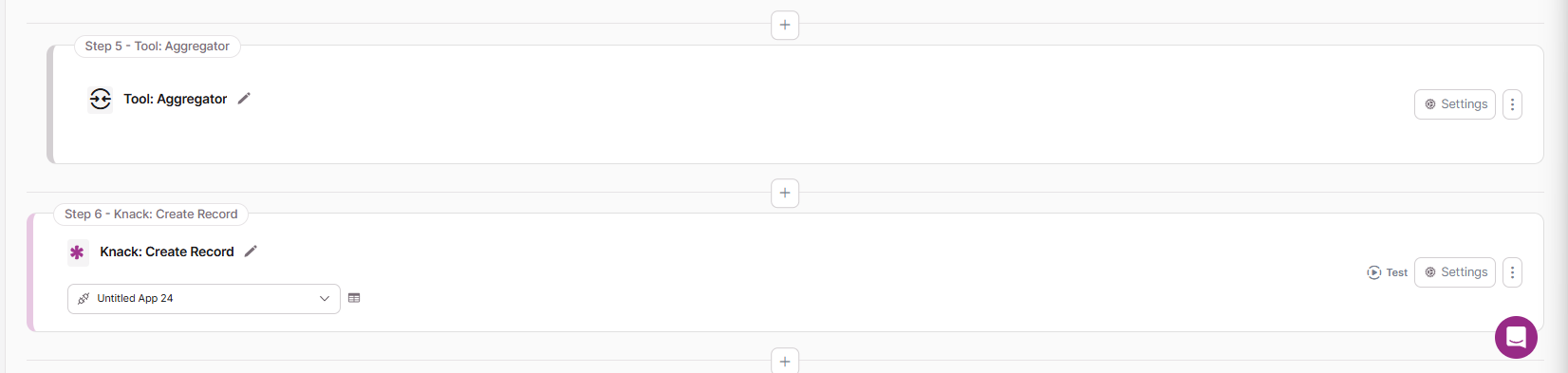
After the Create Registration action, add the Aggregator tool.
Do not skip this step. The Aggregator is what allows the final action to run only once.
Step 6: Configure the Aggregator
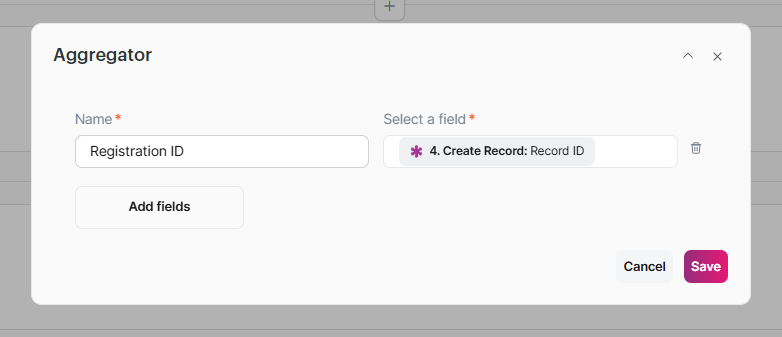
Configure the Aggregator to collect a value from your repeated action.
- Aggregator Name: Registration ID (or any label you prefer)
- Selected Field: Record ID returned by the Create Registration step
The Aggregator will collect the Registration ID from each newly created Registration record and combine them into one list. Once all iterations are done, the Flow moves forward.
The Aggregator does not stop or cancel the Iterator. It waits for all iterations to finish, then lets the Flow continue once. The Iterator still processes every record in full.
Step 7: Add the Final Status Action
After the Aggregator, add your final action.
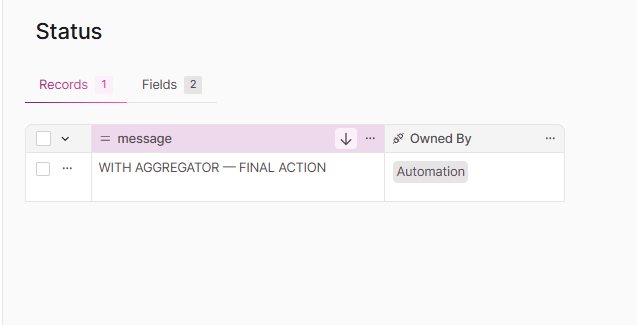
In this example, we're creating a record in the Status table to log that all registrations were completed.
This action will run only once, after all Events have been processed and all Registrations have been created.
Step 8: Test the Flow
Update a record that has multiple connected Events (like Sarah's record with 2 Events).
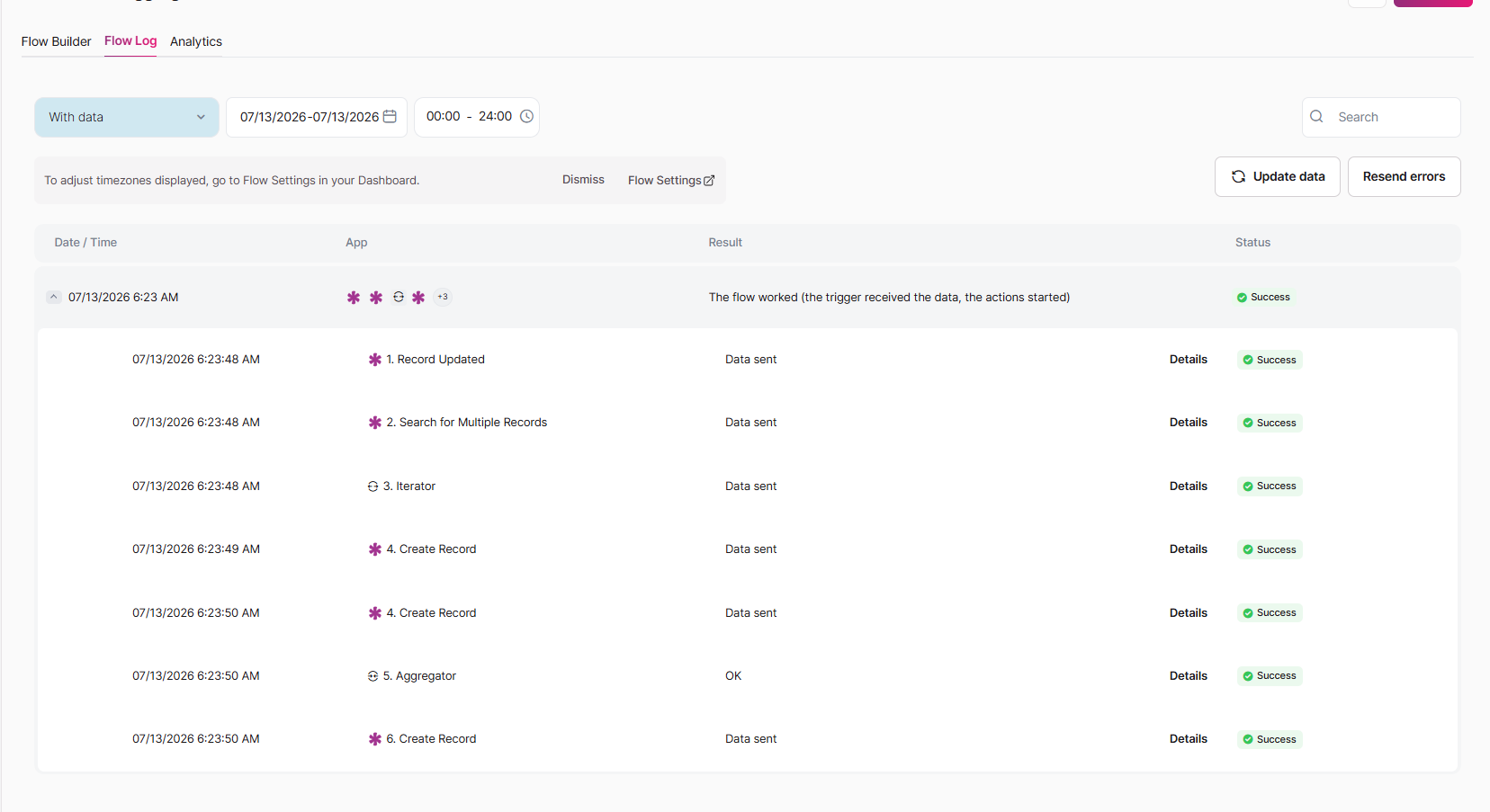
Check your Flow history to confirm:
- Create Registration ran the correct number of times (once per Event)
- The Aggregator ran once
- The final Create Status action ran once
Expected Results
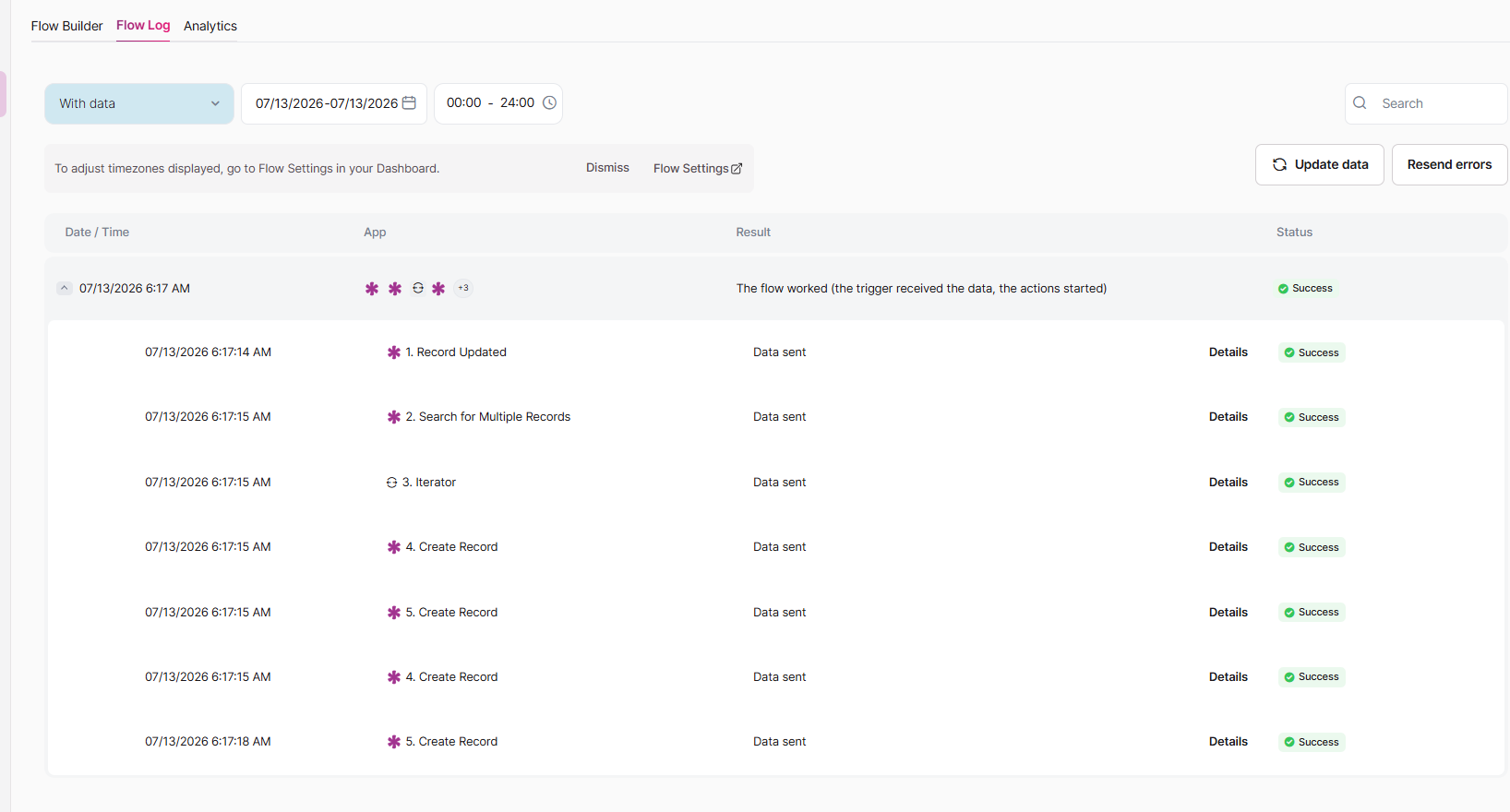
When you run the Flow with 2 Events connected to Sarah, here's what you should see:
| Step | How Many Times It Runs |
|---|---|
| Trigger (Record Updated) | 1 |
| Search for Multiple Records | 1 |
| Iterator (processes 2 Events) | 2 items (Click on 'Details') |
| Create Registration | 2 |
| Aggregator | 1 |
| Create Status | 1 |
Total registrations created: 2
Total status records created: 1
Without an Aggregator
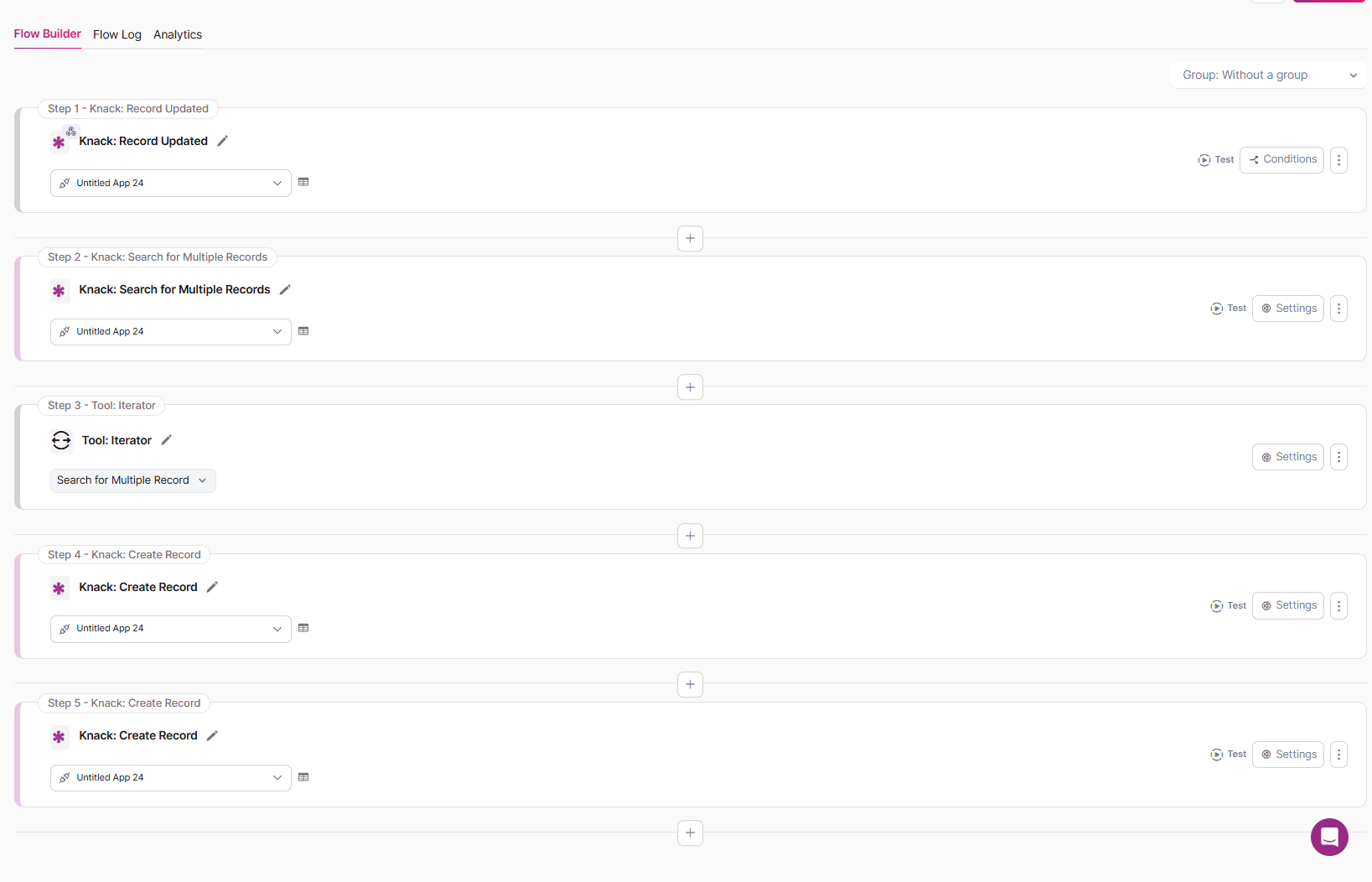
If you place the final action directly after the Iterator without an Aggregator, it will still run multiple times because it remains inside the repeated process.
Here's what happens:
- Iterator processes Event 1 (Annual Conference)
- Create Registration runs for the first time
- Create Status runs for the first time
- Iterator processes Event 2 (Networking Mixer)
- Create Registration runs for the second time
- Create Status runs for the second time
The result: Status records created = 2
With an Aggregator
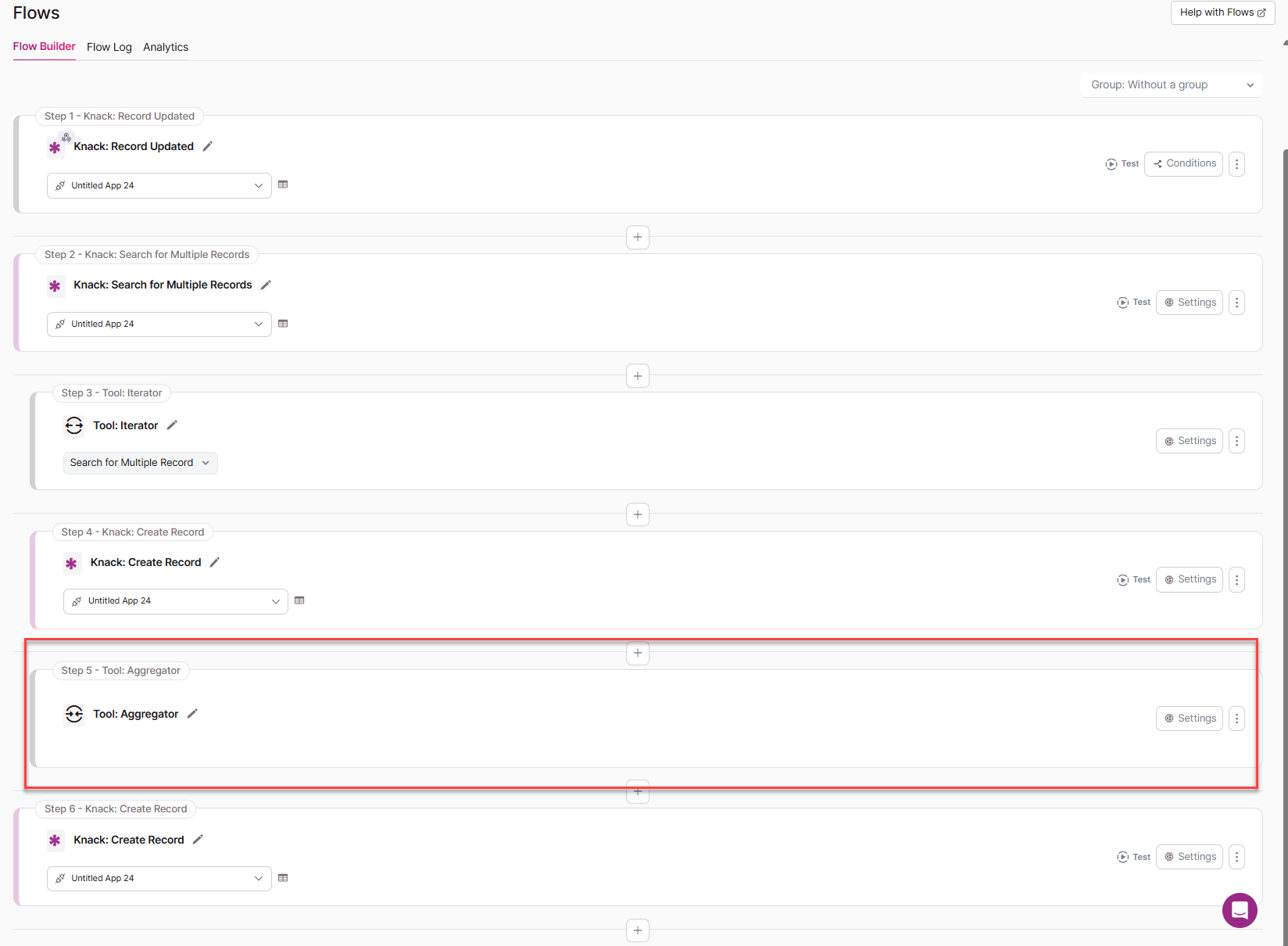
When you insert an Aggregator between the repeated action and the final action, it waits for all iterations to complete before continuing.
Here's what happens:
- Iterator processes Event 1 (Annual Conference)
- Create Registration runs for the first time
- Iterator processes Event 2 (Networking Mixer)
- Create Registration runs for the second time
- Aggregator runs once after both Events have been processed
- Create Status runs once
The result: Status records created = 1
Where to Place Actions
Use this simple rule to decide where each action should go.
Actions that should repeat (run once per record) go between the Iterator and the Aggregator:
- Create Registration
- Create Invoice
- Send a per-record notification
Actions that should run once go after the Aggregator:
- Create a summary or log record
- Send a final notification
- Update a parent record
You do not need to use the aggregated values in your final action. The Aggregator's main job here is to signal that all iterations are complete and allow the Flow to continue once. Whether or not you reference the collected Registration IDs in the next step is entirely up to you.
Common Issues
The final action still runs multiple times
Check that the Aggregator is placed correctly. It should come after all the actions that should repeat, and before the actions that should run once. If the final action is still inside the Iterator scope, it will keep repeating.
The Aggregator is in the wrong position
The Aggregator must sit between your repeated actions and your final action. Double-check the Flow order to make sure nothing that should run once is placed before the Aggregator.
The wrong field was selected in the Aggregator
Make sure you are selecting a field from the repeated action (such as the Record ID from Create Registration). The Aggregator needs a value to collect from each iteration.
Search for Multiple Records returned no records
If the search finds zero records, the Iterator will not run, and neither will any action that follows—including the final action. Check your search filters and confirm the related records exist and meet the filter criteria.
I don't need the aggregated values in my final action
That is fine. You still need the Aggregator in the Flow to control when the final action runs. Simply add it, configure it with any available field, and place your final action after it.
The final action is updating the wrong record
Actions placed after the Aggregator run outside the Iterator's context. They do not automatically know which record was being processed. Make sure the final action explicitly references the correct record using a field from the trigger or search step.
Related Resources
Need help? Check out our Flows Getting Started guide or contact support.
Updated 3 months ago