

Flows Triggers
Learn about webhook, API, and scheduled triggers in this article.
What are Triggers?
Triggers are the starting point of every Flow. When you build a Flow, you define a trigger — a specific event that tells the Flow when to begin. Each trigger operates in real time, transmitting data as the event occurs.
Knack Flows support three trigger types: Webhook, API, and Scheduled.
Webhook Triggers
Upon initiating the Flow, it enters a waiting state for a specific HTTP request directed to a designated URL. Each trigger is equipped with its own internal filter, which identifies the conditions under which a request will activate the corresponding trigger.
For example, consider a trigger named "New Deal" — the Flow will only start when a request containing that indication is sent to the webhook's URL. The trigger can also issue further requests to the API to retrieve more comprehensive data.
The Flow scenario is activated as soon as the request is received.
Note: If multiple webhook requests arrive simultaneously, they are processed sequentially in the order of their arrival.
Common uses:
- Connecting to payment processors like Stripe or PayPal to update order records
- Integrating with marketing tools to add or update contacts
- Starting a Flow in one Knack app based on an event in another Knack app
API Triggers
This trigger type interacts with a connected app's API to check for new or modified entities. Typically, it looks for data from the past hour, although it can extend its search window if needed. By default, the trigger operates on a one-minute schedule.
When the trigger is activated, it requests data for the following hour and receives a data array in response. Each entity within this array is treated individually — for example, if the trigger identifies five records, it will execute the Flow five times. The Flow retains a record of the IDs it processes.
- If the same IDs appear in a subsequent query, the scenario will not be executed again
- If the trigger is set to monitor changes, it also tracks the date of modification for each entity
- If an ID is received again but the date of change differs, the Flow will be triggered again for that entity
If there is no new data available, the Flow's log will indicate "No data."
Errors may also arise due to credential issues or difficulties connecting to a third-party server. In such cases, the third-party system will return an error message.
Knack Connector Triggers
When using the Knack connector, the following trigger events are available:
- Record Created — fires when a new record is added to a selected table
- Record Updated — fires when an existing record in a selected table is modified
- Record Created or Updated — fires when a record is either created or updated, allowing you to handle both events in a single Flow instead of building two separate ones
- Form Submitted — fires when a specified form is submitted in your live app or via API
- Record Deleted — fires when a record is deleted from your app
- Get Records — typically used for data migration or bulk data handling tasks
Note: Triggers fire for changes made in the live app, the Builder, and via API. The following actions do not trigger Flows:
- Importing records
- Batch updates via the Builder
- Tasks (regardless of the action the Task performs)
- Record deletions performed in the Builder
For a full breakdown, see What Knack events can trigger Flows?
Scheduled Triggers
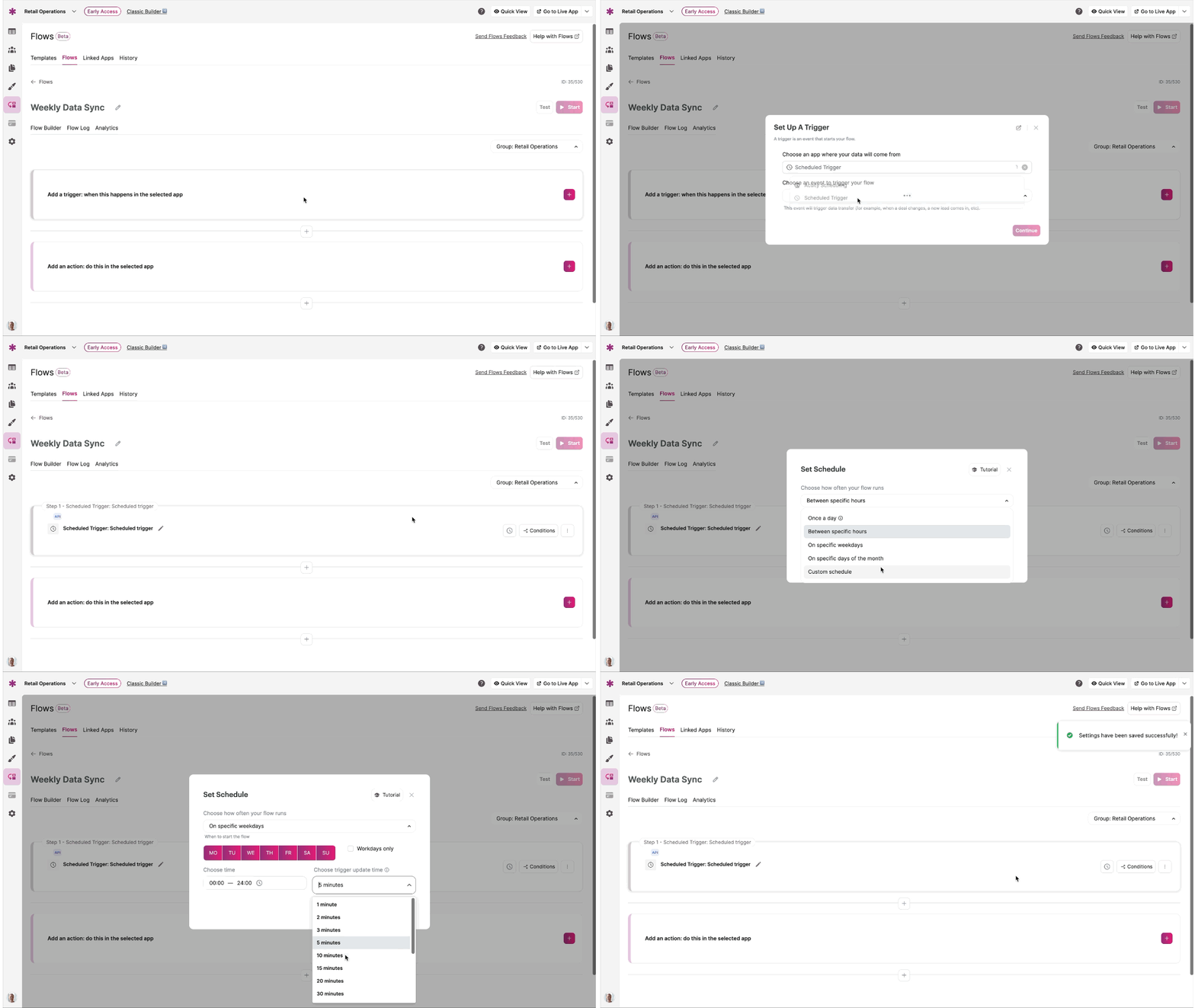
The Scheduled Trigger allows you to configure a Flow to run automatically on a customized schedule. You can set specific dates, times, and recurring intervals to ensure your Flow executes exactly when needed — whether that's every 10 minutes, every hour, daily, weekly, monthly, or at another frequency.
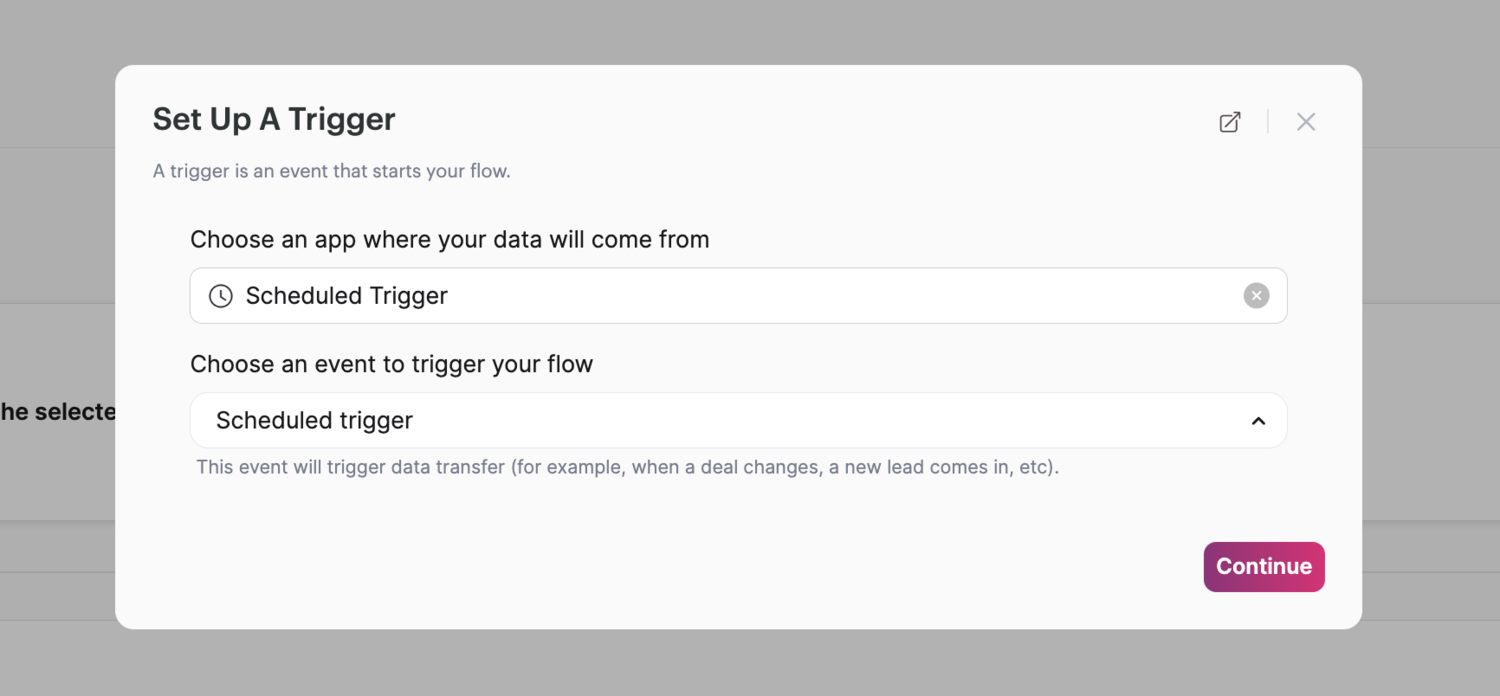
To start your Flow on a custom schedule, search "Scheduled Trigger" in the app/connector dropdown in the first step of your Flow.
Then customize the days, time windows, and update intervals you want the Flow to run on.
Example use cases:
- Data Cleanup: Schedule a Flow to archive or delete outdated records from your database every month
- Report Generation: Every Monday at 9:00 AM, send an email and Slack message to your team with a link to a Knack page of charts and reports containing last week's sales figures
- Appointment Reminders: Set up daily triggers to send reminders to customers about their scheduled appointments the next day
- Inventory Syncing: Run a Flow nightly to pull inventory levels from your source-of-truth system and update downstream systems
- Task Notifications: Schedule daily or weekly notifications to assign and remind team members of pending tasks
Troubleshooting Triggers
- To modify connection settings, you must first pause the Flow
- To edit Field Settings and remap your fields, the Flow must be paused as well
- The Flow's log history is the best place to diagnose issues — if no data was found at trigger time, the log will show "No data"
Updated 7 months ago