

ModMed
Connecting your ModMed system to Knack Flows allows you to securely send data from ModMed to your Knack apps.
Setting up Modmed
Please NoteThe Knack integration can only be added by the ModMed team. Please follow the steps below to reach out and have this enabled and get API credentials.
Prerequisites for setting up the connection from flows to ModMed
Before you can connect your ModMed service to Knack, you will need to first get a unique set of API credentials. These API credentials can only be provided by ModMed's practice solutions team.
- Submit a request: Before you can set up the flow connection, you will need to first reach out to [email protected] to request an integration enablement.
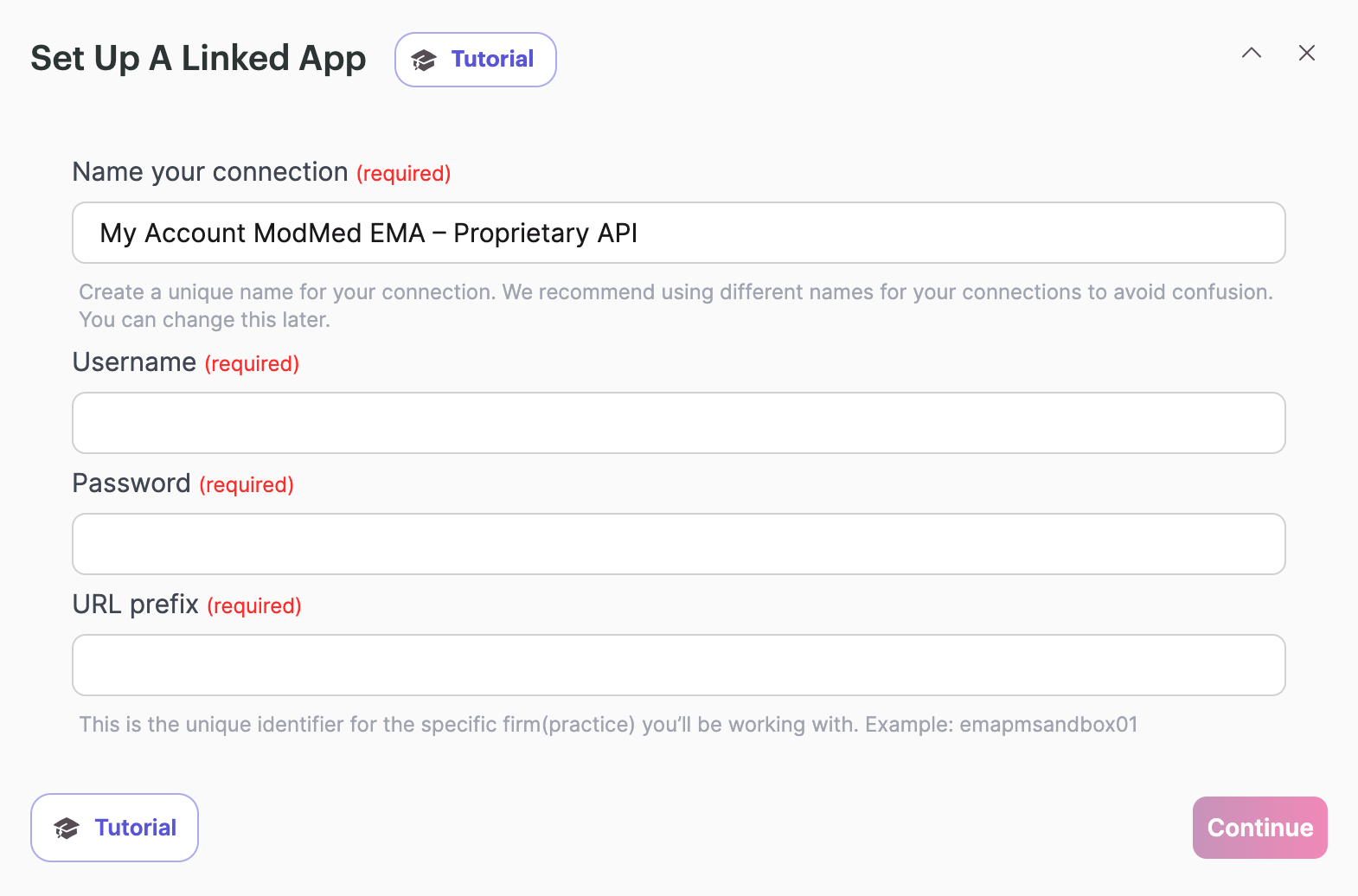
- Credential Generation: Once the ModMed team confirms, they will provide you with a set of API credentials (username and password) that you can use to finalize the connection.
Setting up the ModMed connection in Knack flows
- First, you will need to click into the Trigger or Action action within your flow.
- Search for ModMed and click on either “Certified FHIR API” or “Proprietary API.” Choose the one that best matches your need.
Certified FHIR API - Use this if you require the API to be FHIR Certified for regulatory or standards compliance. Because of this, most of the actions will be read-only.
Proprietary API - Use this if you don't require FHIR compliance or if you require actions that can create or update data within your ModMed system.
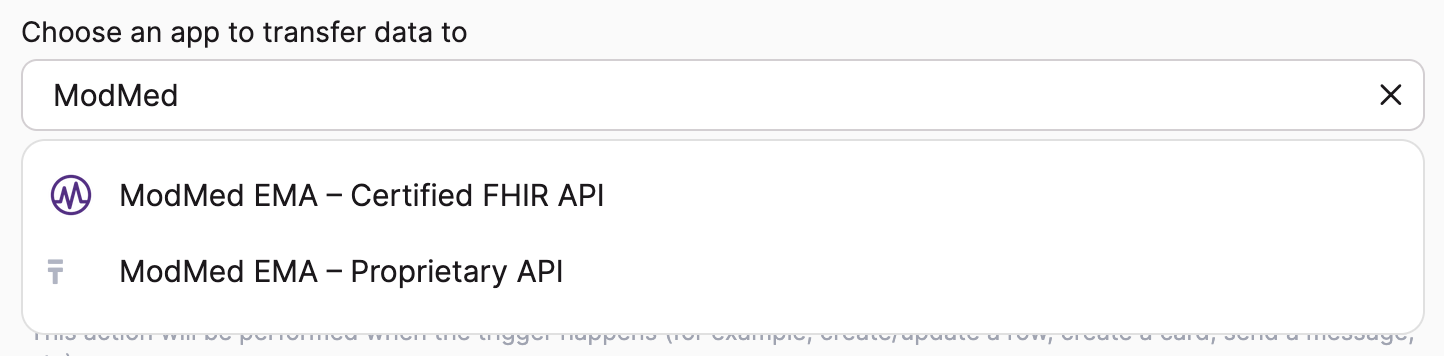
- After selecting the type of ModMed API, you can now set up the connection by clicking on the dropdown under the “Connect your ModMed EMA” section
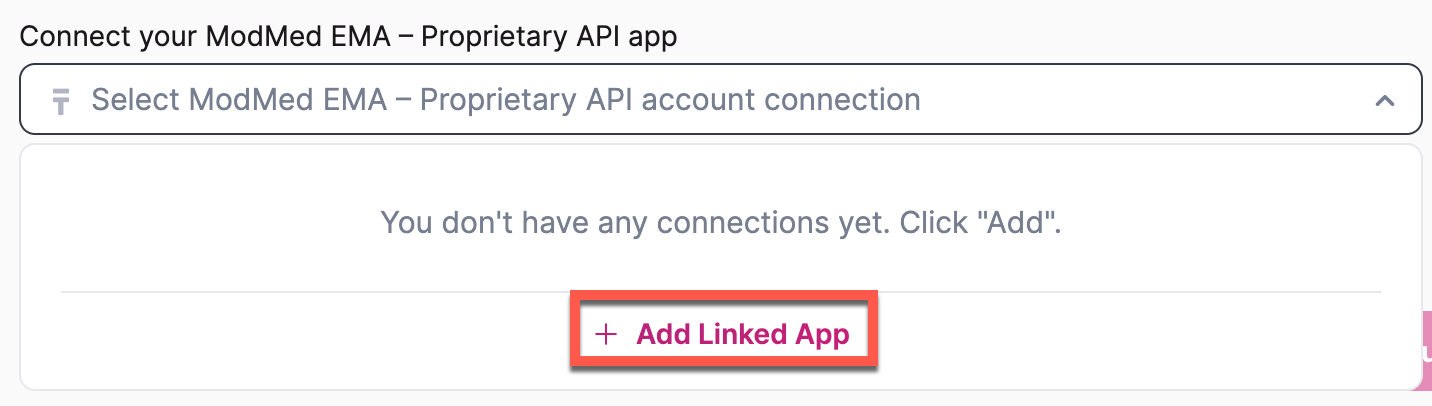
- After this, you can now add the API credentials provided by the ModMed practice solutions team as outlined in the “Prerequisites for setting up the connection from flows to ModMed” section.
Certified FHIR API
Triggers
Patient Resource Updated
Returned Fields
Identifier - Amount of elements
Name - Amount of elements
Telecom - Amount of elements
Address - Amount of elements
Full URL
Resource Type
Patient ID
Gender
Birth Date
Marital Status
Last Updated
[Array] Identifier
- System
- Value
[Array] Name
- Family Name
- Given Names
[Array] Telecom
- System
- Value
- Use
- Rank
[Array] Address
- Use
- Type
- Line
- City
- State
- Postal Code
- Country
NOTE: [Array] indicates that these fields return multiple objects within the field. You will need to use an iterator or row selection to access these fields.
Encounter Updated
Returned Fields
Participants - Amount of elements
Diagnosis - Amount of elements
Encounter ID
Last Updated
Resource type
Status
Class code
Class (Display)
Type
Patient URL
Start Time (Period)
End Time (Period)
Location URL
[Array] Participants
- Participant URL
- Type code
- Type (Display name)
[Array] Diagnoses
- Condition URL
NOTE: [Array] indicates that these fields return multiple objects within the field. You will need to use an iterator or row selection to access these fields.
Actions
Search Patients
Parameters
Phone
A portion of the given name of the patient
MMI stores several identifiers for Patients
This is the patient's last name (Exact Match)
Gender - ID (Multichoice)
- Male
- Female
- Unknown
This is the patient's Date of birth (YYY-MM-DD format)
Patients referring provider
Active (Multichoice)
- No
- Yes
Returned Fields
Identifier - Amount of elements
Name - Amount of elements
Telecom - Amount of elements
Address - Amount of elements
Phone
A portion of the given name of the patient
MMI stores several identifiers for Patients.
This is the patient's last name
Gender - ID
Gender - Title
This is the patient's Date of birth
Patient's referring provider
Active
Full URL
Resource Type
Last Updated
Active
Birth Date
Deceased
Marital Status
[Array] Identifier
- System
- Value
[Array] Name
- Family Name
- Given Names
[Array] Telecom
- System
- Value
- Use
- Rank
[Array] Address
- Use
- Type
- Line
- City
- State
- Postal Code
- Country
NOTE: [Array] indicates that these fields return multiple objects within the field. You will need to use an iterator or row selection to access these fields.
Get Patient by ID
Parameters
Patient ID (Required)
Returned Fields
Identifier - Amount of elements
Name - Amount of elements
Telecom - Amount of elements
Address - Amount of elements
Contact - Amount of elements
General Practitioner - Amount of elements
Patient ID
Full URL
Resource Type
Last Updated
Active
Gender - ID
Gender - Title
Birth Date
Deceased
Marital Status
Communication
[Array] Identifier
- System
- Value
[Array] Name
- Family Name
[Array] Telecom
- System
- Value
- Use
- Rank
[Array] Address
- Use
- Type
- Address Line
- City
- State
- Postal Code
- Country
[Array] Contact
- Name
- Telecom
- Value (Phone or Email)
[Array] General Practitioner
- ID System
- ID Value
- Display
NOTE: [Array] indicates that these fields return multiple objects within the field. You will need to use an iterator or row selection to access these fields.
Search Encounters
Parameters
The patient or group present at the encounter
Status - ID
ID of the appointment
Returned Fields
Results - Amount of elements
The patient or group present at the encounter
Status - ID
Status - Title
ID of the appointment
[Array] Results
- Resource type
- Encounter ID
- Last Updated
- Status - ID
- Status - Title
- Participant
- Type
- Start Time
- Class code
- Class (display)
NOTE: [Array] indicates that these fields return multiple objects within the field. You will need to use an iterator or row selection to access these fields.
Get Encounters
Parameters
Encounter ID (Required)
Returned Fields
Type - Amount of elements
Participant - Amount of elements
Location - Amount of elements
Encounter ID
Resource type
Last Updated
Status - ID
Status - Title
Class code
Class (display)
Start Time
[Array] Type
- Code
- Display name
[Array] Participant
- Display name
- URL
[Array] Location
- Reference (URL)
- Display URL
NOTE: [Array] indicates that these fields return multiple objects within the field. You will need to use an iterator or row selection to access these fields.
Search Diagnostic Reports
Parameters
Patient ID
Requisition Id
Type - ID (Multiple Choice)
- Lab
- Log
Returned Fields
Results - Amount of elements
Patient ID
Requisition Id
Type - ID
Type - Title
[Array] Results
- Resource type
- Diagnostic Report ID
- Last Updated
- Identifier system
- Identifier (value)
- Status
- Code
- Effective Date Time
- Issued (Date/Time)
- Encounter URL
- Performer
- Patient URL
NOTE: [Array] indicates that these fields return multiple objects within the field. You will need to use an iterator or row selection to access these fields.
Proprietary API
Triggers
Patient Updated
Returned Fields
Identifier - Amount of elements
Name - Amount of elements
Telecom - Amount of elements
Address - Amount of elements
Contact - Amount of elements
Communication - Amoun tof elements
General Practitioner - Amount of elements
Patient ID
Resource Type
Active
Gender
Marital Status
Birth date
Date Updated
[Array] Identifier
- System
- Value
[Array] Name
- Family Name
- Given Names
[Array] Telecom
- System
- Value
- Use
- Rank
[Array] Address
- Use
- Type
- Line
- City
- State
- Postal Code
- Country
[Array] Contact
- Relationship
- Name
- System
- Value
[Array] Communication
- Language
[Array] General Practitioner
- Type
- System
- Value
- Display
NOTE: [Array] indicates that these fields return multiple objects within the field. You will need to use an iterator or row selection to access these fields.
Encounter / Visit Completed
Returned Fields
Participant - Amount of elements
Diagnosis - Amount of elements
Location - Amount of elements
Resource type
Encounter ID
Status
Class - Code
Class - Display
Type
Subject display
Period - Start
Period - End
Data Updated
[Array] Participant
- Type
- Individual Display
[Array] Diagnosis
- Condition display
[Array] Location
- Location display
NOTE: [Array] indicates that these fields return multiple objects within the field. You will need to use an iterator or row selection to access these fields.
Task Updated
Returned Fields
Note - Amount of elements
Resource type
Task ID
Status
Intent
Description
Authored On
Last Modified
Date Updated
Period
Code text
For
Status Reason
Requester
Reason Code
[Array] Note
- Text
NOTE: [Array] indicates that these fields return multiple objects within the field. You will need to use an iterator or row selection to access these fields.
Document Added
Returned Fields
Content - Amount of elements
Resource type
ID
Status
Date
Type
Identifier system
Identifier value
Subject - Reference
Subject - Display
[Array] Content
- Attachement - URL
- Attachment - Size
- Attachment - Creation
NOTE: [Array] indicates that these fields return multiple objects within the field. You will need to use an iterator or row selection to access these fields.
Charge Created
Returned Fields
Extension - Amount of elements
Reason - Amount of elements
Resource type
ID
Status
Subject - References
Subject - Display
Context - Reference
Context - Display
[Array] Extension
- URL
- Value String
[Array] Reason
- Text
NOTE: [Array] indicates that these fields return multiple objects within the field. You will need to use an iterator or row selection to access these fields.
Actions
Find Patient
Parameters
Family
Given name
MMI stores several identifiers for Patients
Phone
Returned Fields
Identifier - Amount of elements
Name - Amount of elements
Telecom - Amount of elements
Address - Amount of elements
Contact - Amount of elements
Communication - Amount of elements
General Practitioner - Amount of elements
Patient ID
Resource type
Active
Gender
Marital Status
Birth date
Family
Given name
MMI stores several identifiers for Patients
Phone
[Array] Identifier
- System
- Value
[Array] Name
- Family
- Given
[Array] Telecom
- System
- Value
- Use
- Rank
[Array] Address
- Use
- Type
- Line
- City
- State
- Postal Code
- Country
[Array] Contact
- Relationship
- Name
- System
- Value
[Array] Communication
- Language
[Array] General Practitioner
- Type
- System
- Value
- Display
NOTE: [Array] indicates that these fields return multiple objects within the field. You will need to use an iterator or row selection to access these fields.
Retrieve Patient by ID
Parameters
Patient ID (Required)
Returned Fields
Identifier - Amount of elements
Name - Amount of elements
Telecom - Amount of elements
Address - Amount of elements
Contact - Amount of elements
Communication - Amount of elements
General Practitioner - Amount of elements
Patient ID
Resource type
Active
Gender
Marital Status
Birth date
[Array] Identifier
- System
- Value
[Array] Name
- Family
- Given
[Array] Telecom
- System
- Value
- Use
- Rank
[Array] Address
- Use
- Type
- Line
- City
- State
- Postal Code
- Country
[Array] Contact
- Relationship
- Name
- System
- Value
[Array] Communication
- Language
[Array] General Practitioner
- Type
- System
- Value
- Display
NOTE: [Array] indicates that these fields return multiple objects within the field. You will need to use an iterator or row selection to access these fields.
Get Encounter Details by ID
Parameters
Encounter ID (Required)
Returned Fields
Participant - Amount of elements
Diagnosis - Amount of elements
Location - Amount of elements
Resource type
Encounter ID
Status
Class - Code
Class - Display
Type
Subject display
Period - Start
Period - End
Date Updated
[Array] Participant
- Type
- Individual display
[Array] Diagnosis
- Condition display
[Array] Location
- Location display
NOTE: [Array] indicates that these fields return multiple objects within the field. You will need to use an iterator or row selection to access these fields.
Search Encounter Details
Parameters
Status
Patient
ID of the appointment
Returned Fields
Participant - Amount of elements
Diagnosis - Amount of elements
Location - Amount of elements
Resource type
Encounter ID
Status
Class - Code
Class - Display
Type
Subject display
Period - Start
Period - End
Date Updated
Patient
ID of the appointment
[Array] Participant
- Type
- Individual display
[Array] Diagnosis
- Condition display
[Array] Location
- Location display
NOTE: [Array] indicates that these fields return multiple objects within the field. You will need to use an iterator or row selection to access these fields.
Search Documents
Parameters
Description
Document reference identifier
Patient
Returned Fields
Content - Amount of elements
Description
Document Reference identifier
Patient
Resource type
ID
Status
Date
Type
Identifier system
Identifier value
Subject - Reference
Subject - Display
[Array] Content
- Attachment - URL
- Attachment - Size
- Attachment - Creation
NOTE: [Array] indicates that these fields return multiple objects within the field. You will need to use an iterator or row selection to access these fields.
Want to see an action, trigger, or connection added?
We are constantly looking to improve flows. If you have feedback on the functionality, actions, triggers, or connections. You are welcome to submit feedback to our product team here.
Updated 24 days ago