

Fullscript
Connecting your Fullscript system to Knack Flows allows you to securely send data from Fullscript to your Knack apps.
What You'll Learn
This article explains how to connect Fullscript to Knack Flows, and covers every Fullscript trigger and action available once the connection is set up. Fullscript is a supplement prescribing and dispensing platform, so this connector is built for practices and health tech teams that need to automate patient records, treatment plans, and orders.
About Fullscript
Fullscript is a platform that lets practitioners prescribe professional-grade supplements and lab tests to patients through treatment plans, then track orders and adherence as patients fill them. It gives practices a catalog of nutraceutical products, a way to build and send supplement plans to patients, and order tracking once a plan is fulfilled. Connecting Fullscript to Knack Flows lets you automate patient, treatment plan, and order workflows between Fullscript and your Knack app.
Setting Up the Fullscript Connection
Fullscript connects to Flows with OAuth, so you don't need to copy an API key or secret. You sign in to Fullscript and approve the connection.
-
Add a Fullscript trigger or action to your Flow, then select Set up a linked app.
-
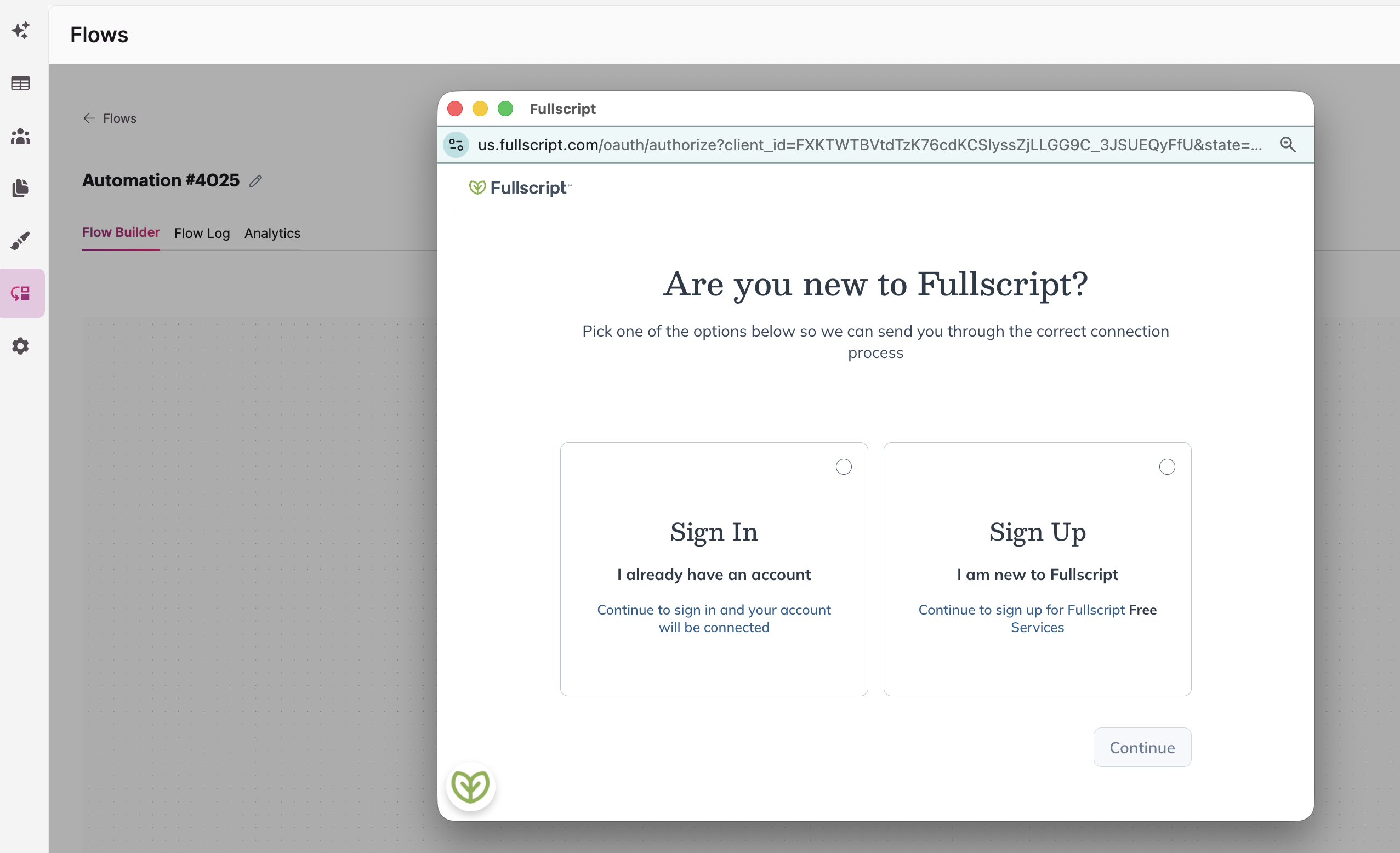
A Fullscript window opens and asks Are you new to Fullscript? Choose the option that fits you, then select Continue:
- Sign In: Choose this if you already have a Fullscript account. You'll sign in, and your account will be connected.
- Sign Up: Choose this if you're new to Fullscript. You'll sign up for Fullscript's free services, and your new account will be connected.
-
Complete the sign in or sign up in the Fullscript window.
-
Once you finish, your Fullscript connection is ready. You can now set up your Flow.
The connection uses the Fullscript account you sign in withSign in with the Fullscript account that should have access to the patients, treatment plans, and orders your Flow works with.
Fullscript Triggers
Fullscript offers the following triggers in Flows. You can find full technical detail in Fullscript's API Documentation.
| Trigger | Summary |
|---|---|
| Order Placed | Fires when a patient places an order in Fullscript. Use this to start a Flow the moment an order comes in, for example to update a record in Knack or notify staff of a new order. |
| Patient Created | Fires when a new patient is added in Fullscript. Use this to automatically create a matching patient record in Knack, or to start an onboarding workflow as soon as a patient is added. |
| Product Created | Fires when a new product is added to the Fullscript catalog. Use this to keep a product list in Knack in sync with Fullscript's catalog. |
| Product Updated | Fires when an existing product's details change in the Fullscript catalog. Use this to keep product information in Knack current instead of checking for changes manually. |
Fullscript Actions
Fullscript offers the following actions in Flows. You can find full technical detail in Fullscript's API Documentation.
| Action | Summary |
|---|---|
| Cancel Treatment Plan | Cancels an existing treatment plan in Fullscript. Use this when a plan needs to be called off before the patient completes their order. |
| Create Patient | Creates a new patient record in Fullscript. Use this when a patient is added in your Knack app and needs a corresponding record created in Fullscript. |
| Create Practitioner | Creates a new practitioner record in Fullscript. Use this when a new provider joins your practice and needs an account set up in Fullscript. |
| Create Staff Member | Creates a new staff member record in Fullscript. Use this when a new staff user needs access to manage patients, plans, or orders in Fullscript. |
| Get Dynamic Link for Draft Treatment Plan | Retrieves a link to the plan-building experience for a treatment plan that hasn't been sent yet. Use this to let a practitioner jump straight into finishing a draft plan from within your Knack app. |
| Get Dynamic Link for New Treatment Plan | Retrieves a link to start building a brand new treatment plan for a patient. Use this to let a practitioner launch the plan builder for a specific patient directly from your Knack app. |
| List Orders for Patient / Clinic | Retrieves a list of orders for a specific patient or for the clinic as a whole. Use this when you need an order history rather than the details of just one order. |
| List Treatment Plans for Patient | Retrieves all treatment plans on record for a specific patient. Use this when you need a patient's full plan history rather than a single plan. |
| Retrieve Order Details | Retrieves the full details for one specific order using its order ID. Use this when you already know which order you need information on. |
| Retrieve Patient Details | Retrieves the full record for a specific patient using their patient ID. Use this when a Flow needs to pull a patient's information into Knack. |
| Retrieve Treatment Plan | Retrieves the full details for one specific treatment plan using its plan ID. Use this when you already know which plan you need information on. |
| Search Patients | Searches for patients using criteria like name or other identifying details. Use this when you don't have a patient ID yet and need to find the matching patient record first. |
| Update Patient | Updates an existing patient record in Fullscript. Use this when patient details change in your Knack app and need to be reflected back in Fullscript. |
| Update Practitioner | Updates an existing practitioner record in Fullscript. Use this when a provider's details change and need to be kept current in Fullscript. |
| Update Staff Member | Updates an existing staff member record in Fullscript. Use this when a staff user's details or access needs change in Fullscript. |
| Update Treatment Plan | Updates an existing treatment plan in Fullscript. Use this when a plan's recommendations or details need to change after it's already been created. |
What You Can Do with Fullscript and Flows
A few examples of what you can automate by combining Fullscript's triggers and actions:
- Patient sync. Use the Patient Created trigger to automatically create a matching record in Knack every time a new patient is added in Fullscript.
- Order tracking. Use the Order Placed trigger to update a Knack record or notify staff the moment a patient places an order.
- Treatment plan automation. Use Get Dynamic Link for New Treatment Plan to let a practitioner jump straight into building a plan for a patient from inside your Knack app.
- Catalog sync. Use the Product Created and Product Updated triggers to keep a product list in Knack current with Fullscript's catalog.
Next Steps
- List of All 600+ connectors within Flows to see other connectors available in Flows.
- Fullscript's API Documentation for full technical reference on every endpoint behind these actions.
Want to see an action, trigger, or connection added?We're constantly looking to improve Flows. If you have feedback on the functionality, actions, triggers, or connections, you're welcome to submit feedback to our product team.
Updated 9 days ago