

Checking That Your Access Rules Actually Work
Test whether Knack is enforcing your access rules or your frontend is only hiding records, using an unfiltered count test that takes about five minutes.
What You'll Learn
Your app showing the right records is not evidence that your access rules work. An app that filters what it displays looks identical to one where Knack refuses to hand the data over. This article shows you how to tell the difference, using a test that needs no technical skills, plus an optional second level for anyone who wants evidence they can screenshot.
Why Your App Looking Correct Proves Nothing
Sign in as a patient in your custom frontend and you see one visit. That looks right. It tells you nothing about whether the app is secure.
There are two completely different ways an app can produce that result:
- Your frontend asked Knack for every visit, got all of them, and chose to display one
- Your frontend asked Knack for every visit, and Knack returned only the one that patient is allowed to see
The screen looks the same either way. In the first case, all the other visits already arrived in that person's browser. Anyone who opens their browser's developer tools, or copies their session token into another tool, can read every one of them.
Configuring data access is not the same as enforcing itSetting up the Data Access grid in the Builder does nothing until you turn on the enforcement toggle. A fully configured grid with enforcement off behaves exactly like no rules at all. This is the single most common reason a test comes back showing every record.
Frontend Filtering Versus Enforcement
These two words do different jobs, and mixing them up is how apps ship open.
Filtering happens in your app. Your frontend receives records and decides which ones to put on screen. It's a display choice. The data is already on the user's device.
Enforcement happens in Knack. Knack decides which records to send based on who is asking. Records that person isn't allowed to see never leave Knack.
Filtering makes an app look right. Enforcement makes it safe. You need enforcement, and you can have filtering on top of it for a cleaner interface.
Before You Test
Two things need to be true in Knack, and you should confirm both before you sign in, or the result won't mean anything.
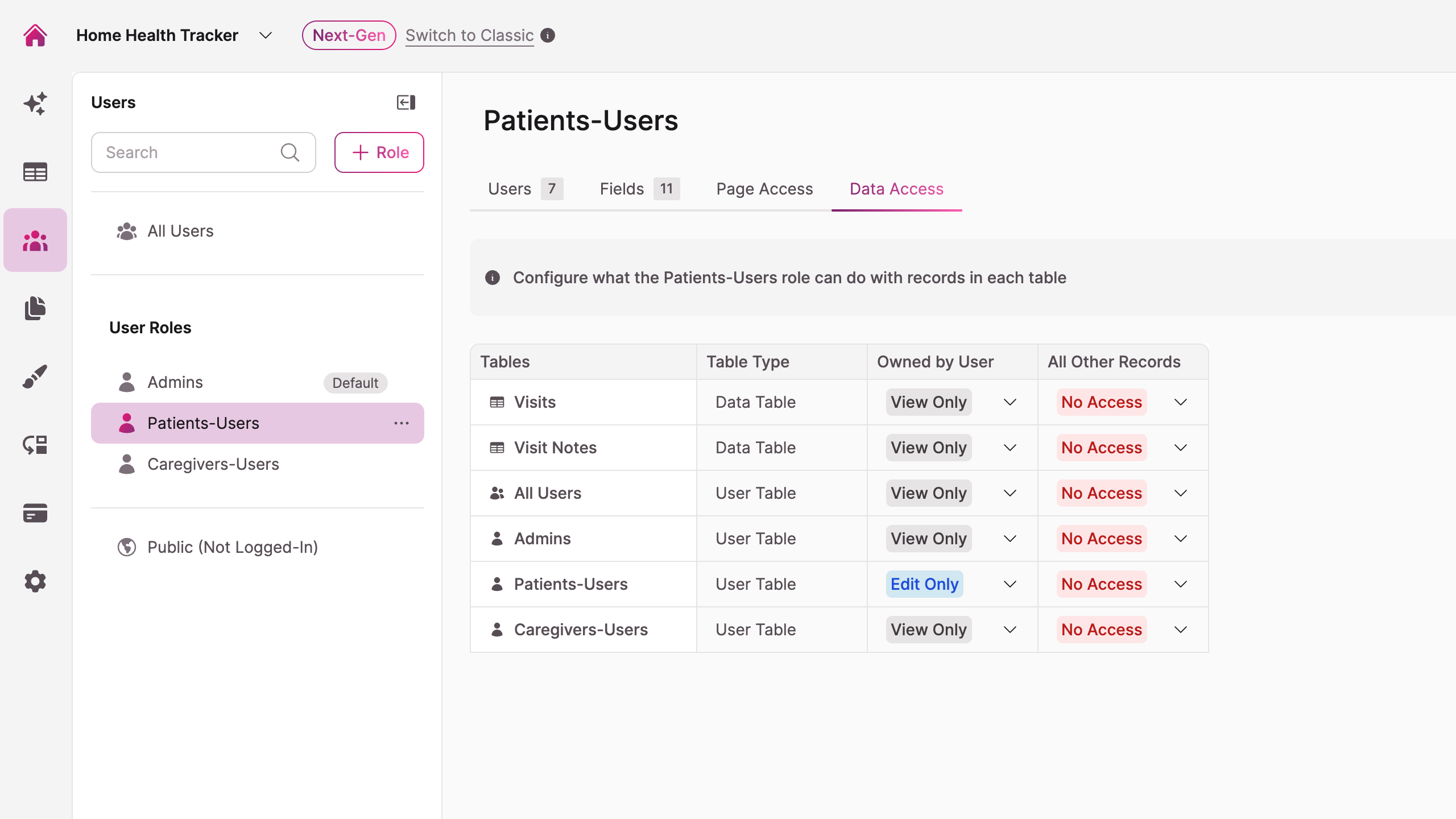
Go to Users, then All Users, then the Data Access tab.
- Your roles and tables are configured in the grid. For the Home Health Tracker, the Patient role on the Visits table is set to Owned By = View Only and All Other Records = No Access.
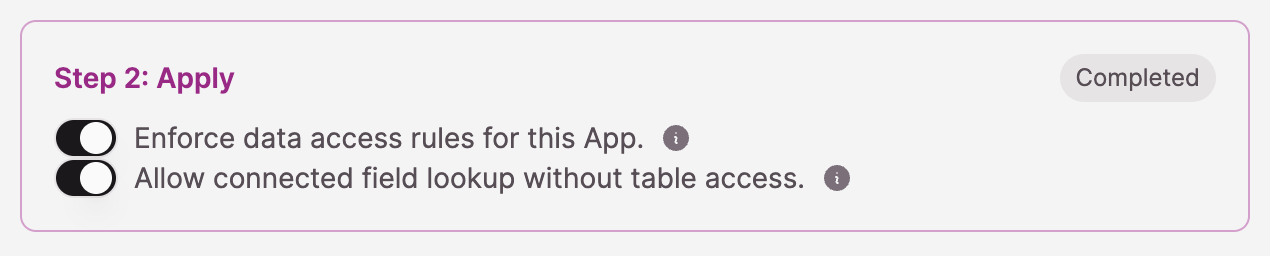
- The toggle labeled Enforce data access rules for this App is on.
If you don't see the Data Access tabData Access is rolling out to apps as it becomes available. If the tab isn't there yet, check Knack's product updates for the current availability, and note that until you have it, your frontend is responsible for every access decision.
What this test does, and doesn't, cover
This test checks Data Access Control, the setting that controls which records come back. It says nothing about Page Access, which controls which Knack pages a role can open and has no effect on what the API returns. A custom frontend never touches Knack's pages, so Page Access isn't part of this test. Data Access Control is the only thing standing between a user and a record.
The Home Health Tracker example above uses Owned By = View Only and All Other Records = No Access. If other roles in your app use Full Access or Edit Only, run the same count test for those too. A table that correctly blocks extra records under View Only can still allow an unwanted edit if Edit Only or Full Access is set somewhere you didn't mean to set it.
Level 1: The On-Screen Count Test
This is the whole test. Most people should do this and stop.
You're going to have your app ask Knack for everything in one table, with nothing filtered out, using the signed-in user's own session. Then you look at how many records come back.
Why the two rules matter
No filters. If your frontend narrows the request, you can't tell who did the narrowing. A small number on screen might mean Knack refused, or it might mean your app asked for less than it could have had. Removing the filter is what makes the result readable.
The signed-in user's own session. Your app may also hold an application-level API key for admin work. That key bypasses enforcement completely. If the test runs on an admin key, you'll see every record even when Knack is enforcing correctly for real users, and you'll spend an afternoon fixing a problem you don't have.
Ask your AI builder to add the test section
Paste this into Lovable, Base44, Claude Code, or whatever you're building with. Replace the table name with your own.
Add a temporary section to the patient dashboard called "Access Test."

It should request all records from the Visits table with no filters and no
search terms, using the signed-in user's own Knack session token, and display
the total number of records returned.

Do not use an application-level API key. Do not filter, limit, or sort the
results anywhere in the frontend. Display the raw count only.

Label the section clearly as a temporary test.
Your builder will report that it's done. Confirm the section actually appears in the running app before you continue, because builders report success on changes that didn't land.
Sign in and read the number
Open the published app, not the builder's preview panel, and sign in as a user with limited access. In the Home Health Tracker, that's a patient account.
The number on screen is your answer.
| What you see | What it means |
|---|---|
| Only the records that user should have | Knack is enforcing. You're done. |
| Every record in the table | Knack is not enforcing. See below. |
| Zero records | Knack is enforcing, but ownership isn't matching. See below. |
| An error instead of a number | See the section on false denials below. |
In the Home Health Tracker test, the Visits table held about nine records and one was owned by the signed-in patient. The count came back as one. That single number is the entire finding.
How to Read an All-Records or Zero-Records Result
Every record came back
Knack handed your app the full table. Work through these in order:
- Confirm the Enforce data access rules for this App toggle is on. It's the most common cause.
- Confirm the grid actually sets All Other Records to No Access for that role and table. A grid row left at a permissive default enforces exactly what it says.
- Confirm the test section used the signed-in user's session and not an application key. Ask your builder to show you which credential the request used.
Zero records came back
Enforcement is working. The problem is that Knack doesn't consider that user the owner of anything in the table.
Ownership isn't automatic. A record connected to a user is not the same as a record owned by that user. If your frontend creates records, something has to set ownership at creation time, and that step is easy to leave out.
Check one record in the Builder and confirm the Owned By value points at the person you signed in as. If it's empty, ownership was never set and the fix belongs in how your app creates records.
One more thing to rule out: if you created your test record by clicking New Record inside the Knack Builder instead of submitting it through your actual frontend, that record is owned by your Builder account, not by the test user. A zero-records result in that case doesn't mean anything is broken. It means the test user was never the owner to begin with. Create test records by signing in to your published app and submitting them as that user, not from inside the Builder. See Understanding the Owned By Field.
For developersThe Owned By field connects to the Accounts table, not to the role table. The same person carries a different record ID in Accounts than in their role table, so an ownership write built from the role-table ID fails with an HTTP 400. Ownership writes need an ID lookup against Accounts first. Owned By is writable through the record API, and enforcement honors ownership set that way.
False Results in Both Directions
The test can lie to you twice, and the two lies point opposite ways.
An app that looks secure and isn't
If any filtering survived in the frontend, the count will look correct no matter what Knack is doing. This is the dangerous one, because it produces a passing result and a false sense of safety.
The tell is that the number looks exactly like the user's normal view. If the test count matches what the user already sees on their regular dashboard, ask your builder to confirm in writing that the test request sends no filter parameters at all.
A denial that isn't a denial
A request that fails is not proof that Knack refused you.
A misformated credential produces the same failure as a genuine permission denial, and the two are hard to tell apart from inside the browser. The most common cause is the word Bearer missing from the authorization header. We manufactured three false denials this way in a single evening of testing.
There's a second trap. Knack denies reads by returning an empty list, not an error. If you were expecting an error to prove your rules work, an empty successful response looks like a broken test when it's actually the correct answer.
For developersDenial shape differs by request type. A denied filtered read returns
200withtotal_recordsof 0, an empty array, andrecast: true. A denied write returns403with a readable body and anerrorCode. A malformed authorization header also returns403, but with no CORS headers, so browser JavaScript can't read the body and the console reports a CORS failure instead. A CORS complaint on an/objects/path means malformed auth, not permissions. The header shape is exact:
Authorization: Bearer lao_<token>andX-Knack-Application-Id: <appId>
Because a denied read and a genuinely empty read are identical, verifying a read boundary needs two sessions: confirm the record exists as its owner, then request it as a non-owner, then compare.
Level 2: The Network Tab Receipt
Skip this unless you want evidence you can screenshot or send to someone. The number from Level 1 already answered the question.
The Network tab is a list of every request your browser made. You're going to find one request and read Knack's reply.
- With the test section on screen, press F12, or right-click the page and choose Inspect. A panel opens.
- Click the Network tab along the top of that panel.
- Refresh the page. The Network tab only records while it's open, so it starts empty.
- In the filter box at the top of the panel, type
records. The list shrinks to a few rows. - Click the row whose name starts with
records. - In the panel that opens, click the Response tab.
Look for total_records near the top of the response. That number came from Knack, before your app touched it. It's the same answer as the on-screen count, in Knack's own words.
Remove the Test Section When You're Done
The test section is a deliberately unfiltered query. It's the right instrument and the wrong thing to leave in a live app.
Remove the temporary "Access Test" section and the unfiltered query that
supports it. Leave the rest of the dashboard unchanged.
Confirm it's gone in the running app rather than taking the builder's word for it. Then run through the app once as a normal user to make sure nothing else was removed along with it.
Updated 16 days ago