

Show Records Connected to the Logged-In User
Configure login-protected pages to display only the records connected to the currently logged-in user, such as their invoices, jobs, or contacts.
Displaying records connected to the logged-in user lets you show each user only the data that belongs to them. For example, customers see their invoices, employees see their assigned jobs, and sales reps see their contacts — all from the same app.
This article walks through how to configure an element on a login-protected page so it only displays records connected to the currently logged-in user.
Before you startThis guide assumes you already have:
- A user role set up in your app. See User Management Fundamentals for details.
- A connection field linking your records table to that user role. See About Connections for details.
- A login-protected page. See How to Create a Login-Protected Page for details.
How the Connected Records Filter Works
When you add an element to a login-protected page, Knack gives you the option to filter records by the logged-in user. This filter uses the connection field between your records table and the user role to determine which records to display.
For example, if you have a Tasks table connected to a Team Member user role, a table element on the Team Member's login page can be set to show only the Tasks assigned to that specific Team Member.
Add an Element That Shows Connected Records
1. Navigate to the login-protected page in the Pages section of the Builder.
You should see the page listed under the login page for the relevant user role.
2. Click "Add Element" to start the element setup process.
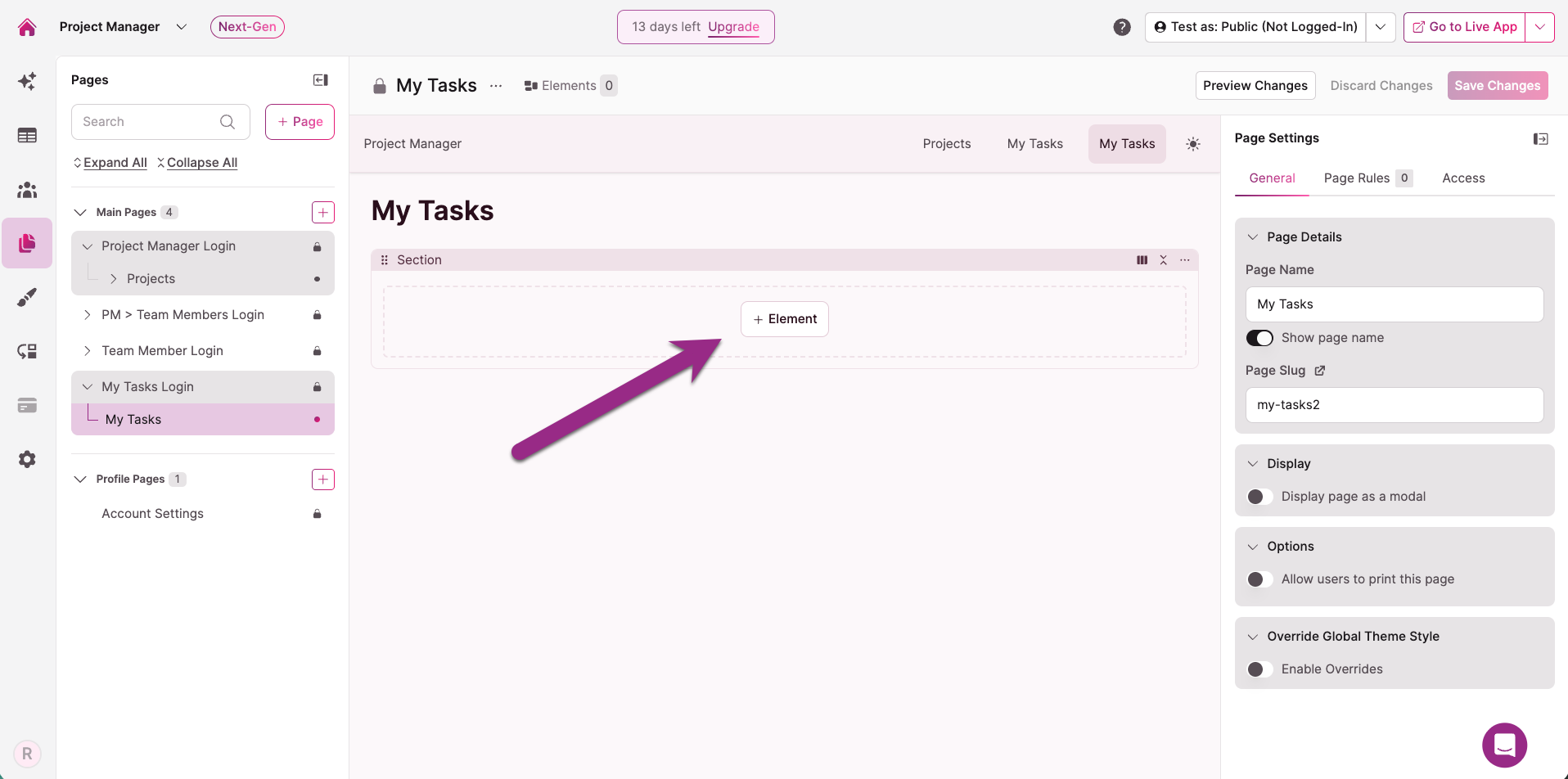
3. Select the element type you want to use.
Common choices include table, list, or calendar elements — any element type that displays multiple records.
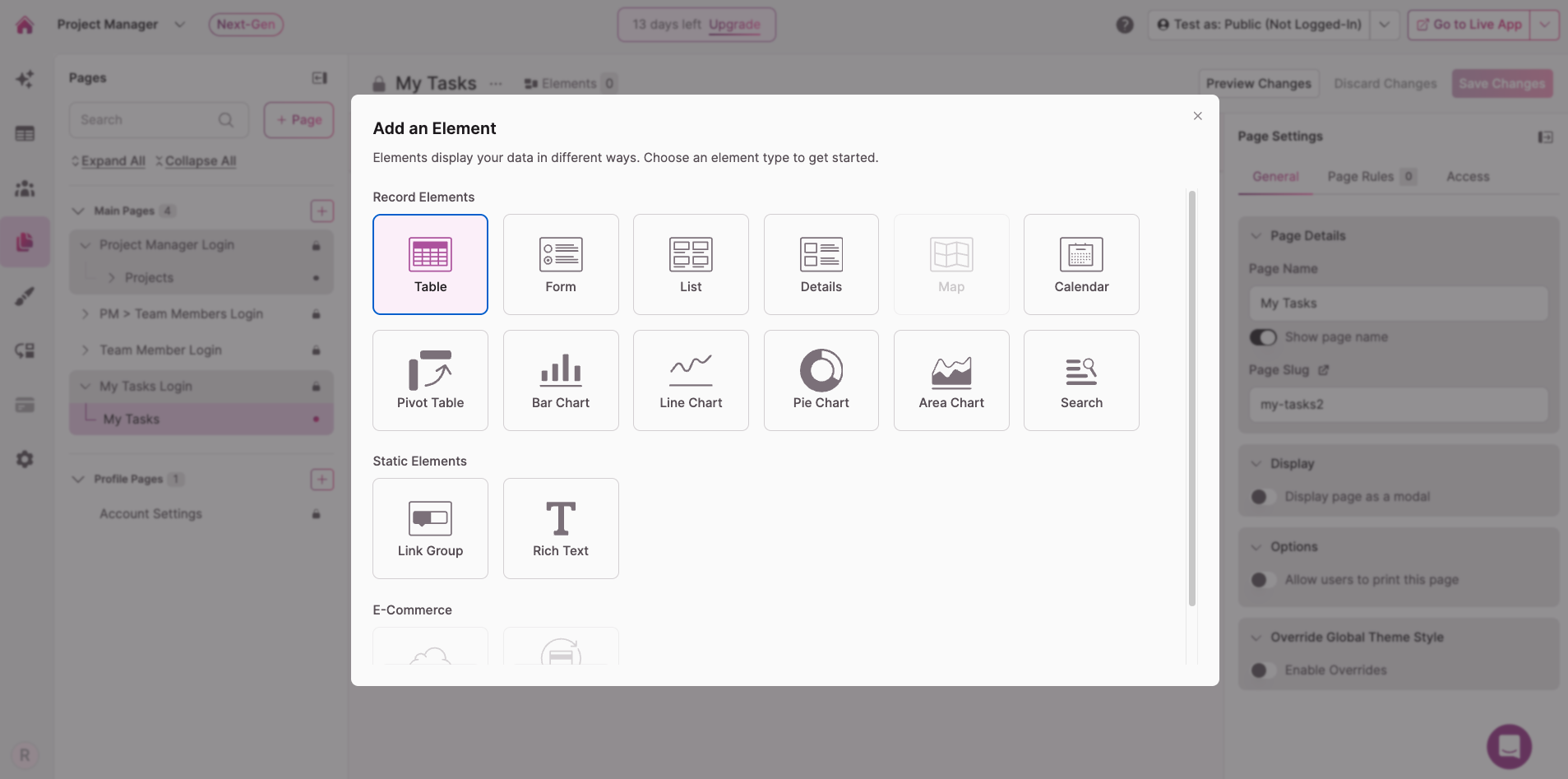
4. Select the table that contains the records you want to display.
Choose the table that has a connection field to the user role for this login page.
5. Choose "Records connected to the logged-in user" as the record source.
This is the key step. When prompted to select which records to display, choose the option that filters by the logged-in user's connection.
Don't see this option?The "Records connected to the logged-in user" option only appears when the page is login-protected and restricted to a specific user role that has a connection to the selected table. If you don't see it, check that your page is configured as a login page for the correct user role. See How to Create a Login-Protected Page for setup steps.
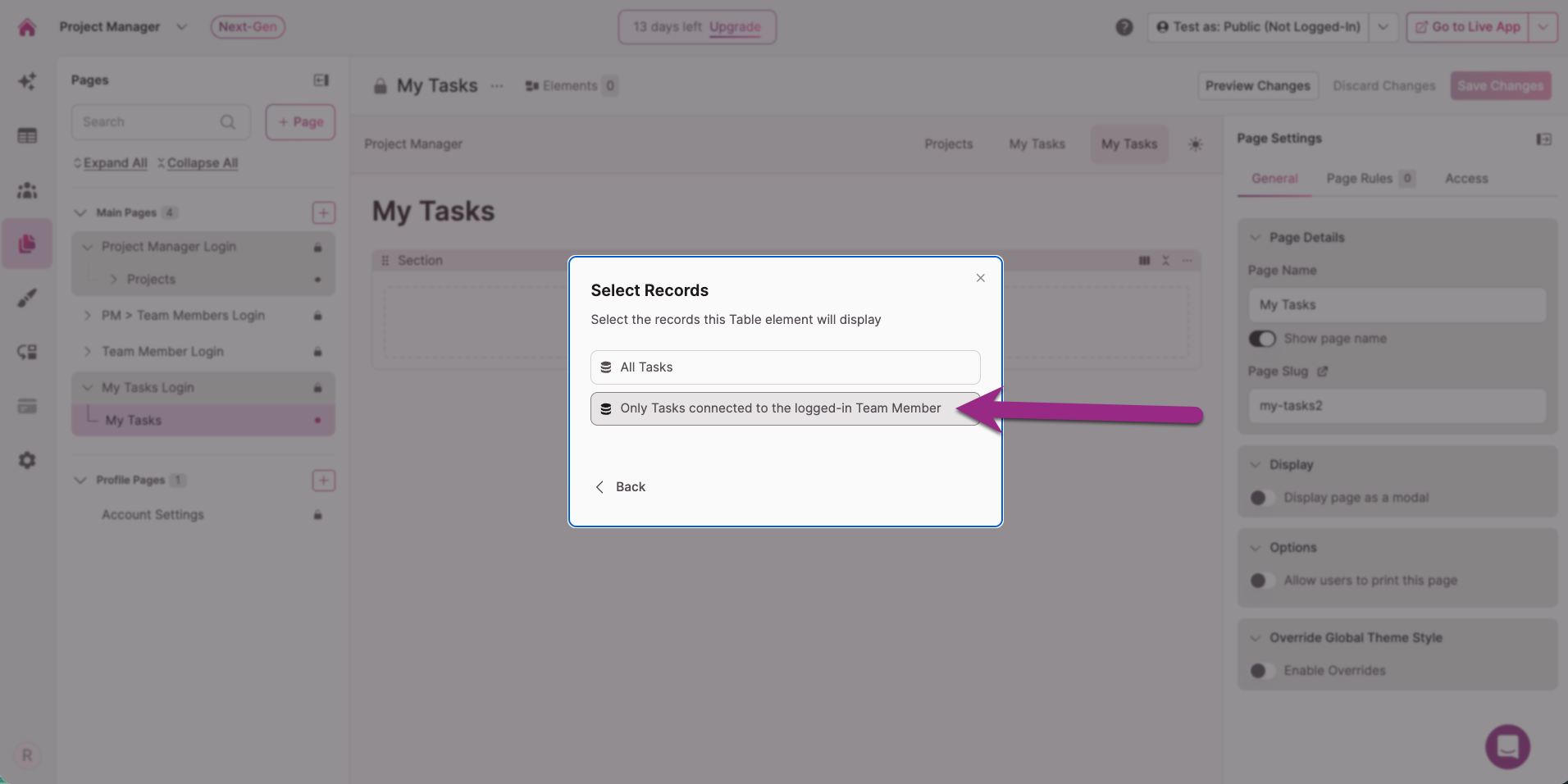
6. Complete the element setup and click "Confirm."
Your element now only shows records where the connection field matches the currently logged-in user.
Test the Configuration
Use the Test As feature to quickly verify your setup. Test As lets you preview your live app as any specific user without needing their login credentials — just select a user from the Builder and see exactly what they see.
See Test As: Quickly Preview & Test Your App as Any User for details on how to use i
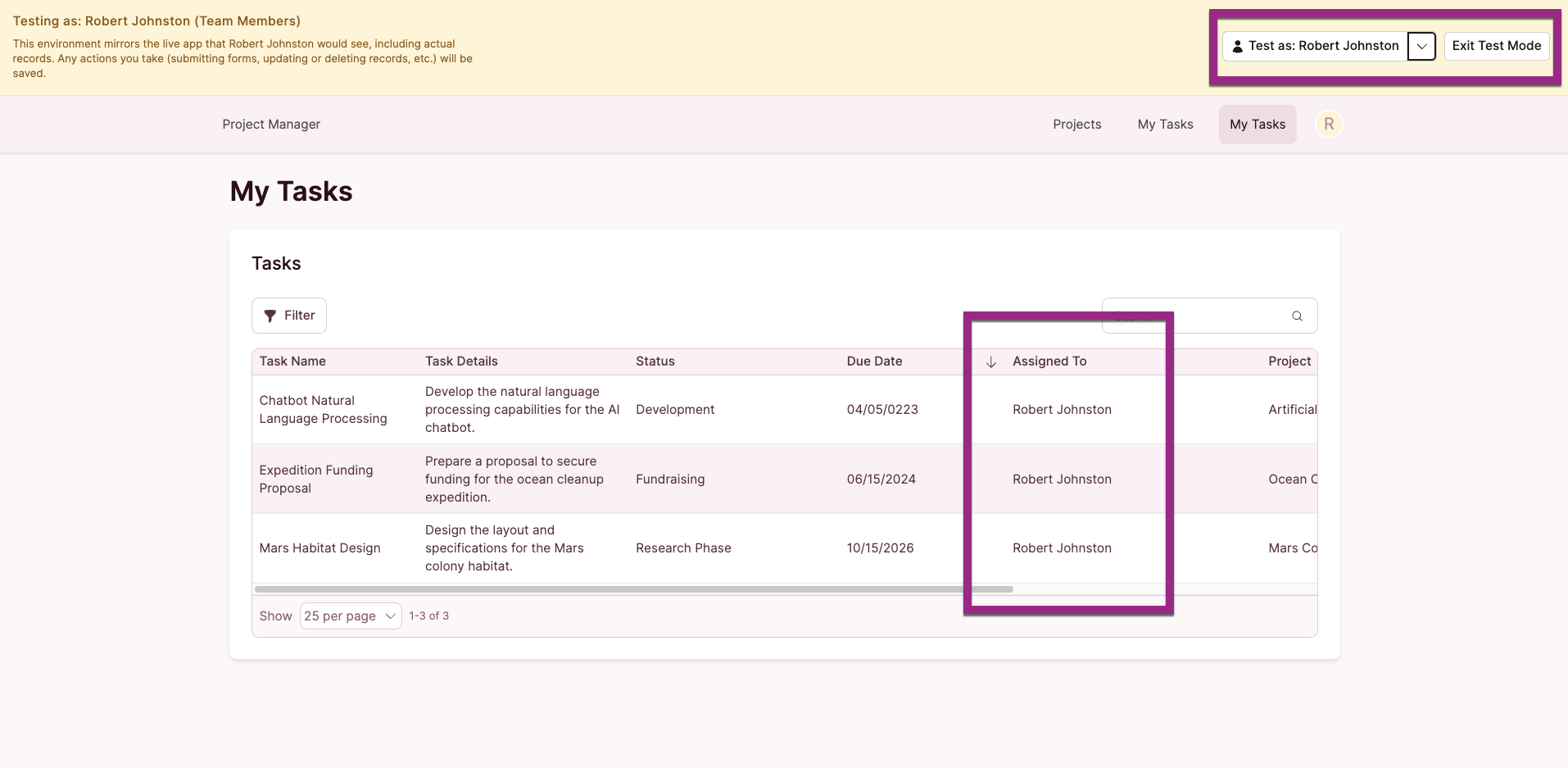
Verify that:
- The logged-in user only sees records connected to them.
- Records connected to other users are not visible.
- New records added with the connection field set to this user appear in the element.
Tip You can check the Source section of the element settings at any time to confirm which records are being displayed and how the filter is applied.
Working With an Existing Page
If you already have a page built and want to show records connected to the logged-in user, you'll need to make sure the page has login protection configured for the correct user role first — then handle the elements.
Add or Update Login Protection
If the page doesn't have login protection yet, or it's set to the wrong user role:
- Click the dropdown arrow next to the page name in the Builder.
- Select Require Login.
- Choose the specific user role that should have access.
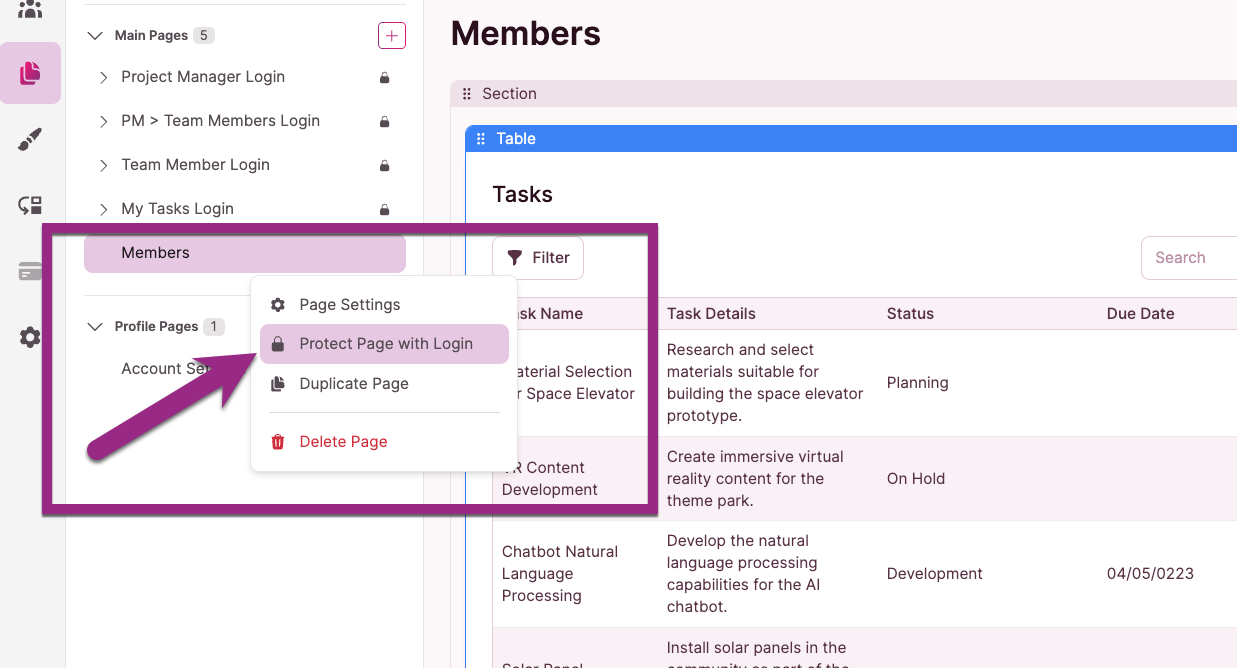
See How to Create a Login-Protected Page for the full walkthrough.
Update Existing Elements or Add New Ones
Once the page is login-protected for the correct user role, you have two options depending on whether the page already has elements:
Adding a new element: Follow the steps in Add an Element That Shows Connected Records above. The "Records connected to the logged-in user" source option will be available during setup as long as the page is login-protected for a user role that has a connection to the selected table.
Updating an existing element: You can add a source filter to an existing element to show records connected to the logged-in user. Navigate to Table Settings > Data Display > Settings > Source Filters.
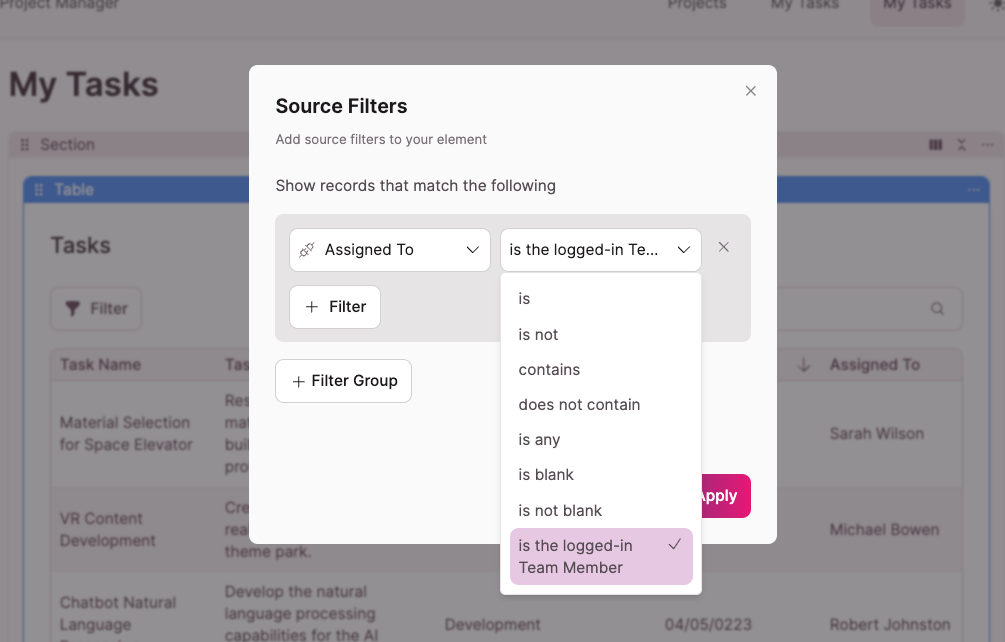
Best practice: delete and re-add the element insteadA source filter added after element creation will filter the displayed records, but it does not carry the logged-in user context downstream. This means features like rules, actions, and other element behaviors won't have access to that context.
When the logged-in user connection is set as the source during element creation, that context is preserved and available throughout the element's configuration. If possible, delete the existing element and re-add it with the correct source selected during setup.
Show Records Connected to a User's Group
You can also display records connected to a logged-in user's company, department, or other group — not just the individual user. For example, a teacher could log in and see all students in their department, not just students directly assigned to them.
See Displaying Records Shared Within User Groups for details.
Troubleshooting
The "Records connected to the logged-in user" option doesn't appear during element setup.
This is the most common issue. It means the page isn't configured as a login-protected page for the correct user role. To fix this:
- Confirm the page is a login page — not just a regular page. You can check this in the Pages section of the Builder. Login pages display a lock icon.
- Confirm the login page is restricted to the specific user role that has a connection to the table you're trying to display. If the page allows all users or the wrong role, the connected records option won't be available for that table.
- Confirm a connection field exists between the records table and the user role assigned to the page. Without this connection, Knack has no way to filter records by user.
Updated 6 months ago